ClarivioGuide DE App Store

The Clarivio Guide

How Clarivio works.

Clarivio keeps what you capture, holds the plan you set, and shows you what you learn, on every horizon from five seconds to a lifetime. Start with any part. The others wait until you want them.

Nothing lost. Everything structured. Clarity when it matters.

Pick a horizon

5 seconds → a lifetime

A short session at each end of the day.

Morning and evening, in the time you have today.

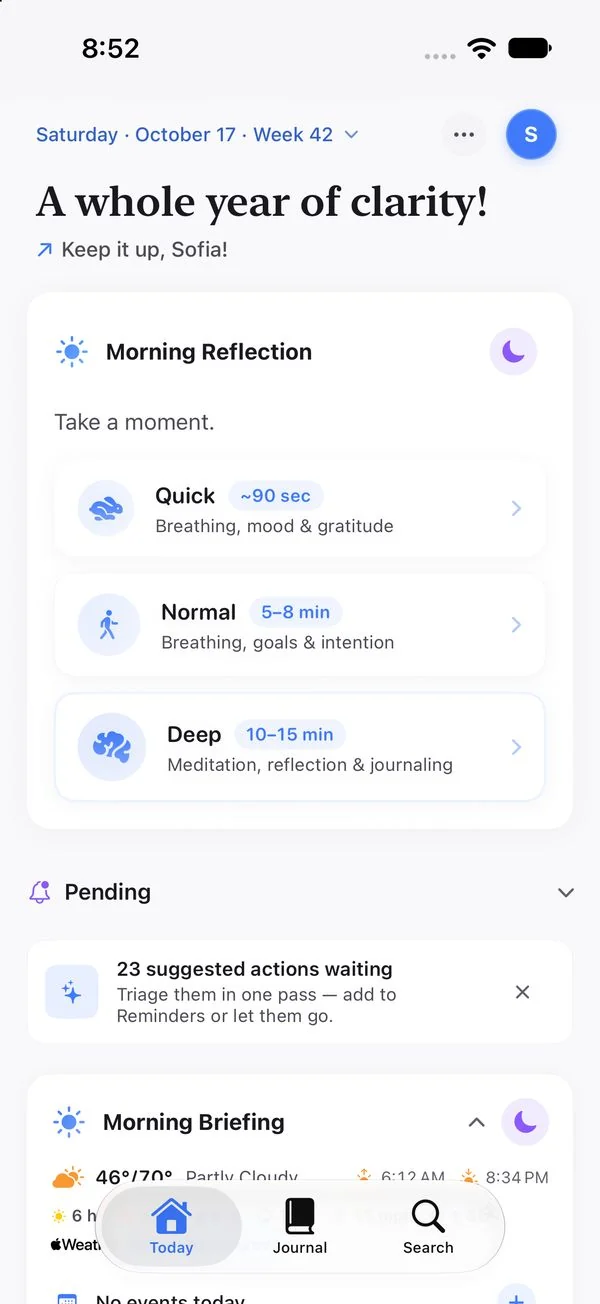
  • Quick takes about 90 seconds, Normal 5–8 minutes, Deep 10–15.
  • Morning: a breath, how you feel, gratitude, what today is for.
  • Evening: wins, habits, what you learned, a note for tomorrow.
  • Then “Day Complete”: the whole day in one summary, with sleep and weather.
~90 sec – 15 minToday → Morning ReflectionWatch check-in
Today in the morning: Morning Reflection offers Quick ~90 sec, Normal 5–8 min and Deep 10–15 min.

01In a nutshell

Your whole life, in one system.

Journal, health, goals, people and ideas live in one app, because they belong together. What you write tonight can change next year’s plan, and the plan you set shows up tomorrow morning.

Three pillars, seven use cases

MemoryKeep it, think with it
  • Capture everything: seconds to save, found years later
  • Think it through: ideas, challenges, decisions
RhythmDays into learning
  • Plan and reflect: daily sessions and reviews
  • Understand body and mind: health, habits, mood
  • Stay close: the people who matter
DirectionWhere and why
  • Set your course: values, goals, key results
  • Know your story: your life, your family

The promise

Nothing lost.
Everything structured.
Clarity when it matters.
  • Save a thought in seconds. The time, place, weather and what you were doing come with it.
  • File it when you like, or never. Search finds it either way.
  • It comes back at the right moment: in the morning briefing, in a review, as the answer to a question.
4 devicesiPhone, iPad and Mac sync through your own iCloud. Apple Watch works with your iPhone.
On deviceAll AI in Clarivio runs on your device, on Apple Intelligence.
No serversYour journal syncs only through your own iCloud. No analytics, no ads.
10 languagesFully translated, from English and German to Japanese and Arabic.

02Before you start

Use what helps. Skip the rest.

Clarivio is large because a life is. Nobody uses all of it, and you never have to fill something in before you get something back.

Every step can be skipped.In sessions and reviews, Next works with whatever you entered, including nothing. Simplify turns a running session into the Quick one.

Nothing needs filing.Leave entries where they land. Search and Ask find them anyway. Organize even has a No filing needed button.

Short on time? Take the short version.Morning and evening come as Quick, Normal or Deep. Quick takes about 90 seconds.

A missed day breaks nothing.Habits count a weekly goal, and a rest day never resets their strength. Reviews open with what the period held, not with what you missed.

It fills in what it can.Sleep, workouts, weather, meetings and places arrive by themselves, once you allow each one.

Plans are optional too.No goals yet? Sessions and reviews work without them. Add a plan when you want one.

What each part takes, if you want it

Captureseconds
Quick session~90 sec
Weekly review~8 min
Monthly review~8 min
Quarterly review~10 min
Yearly review~15 min

Bars to scale, 15 minutes is the full width. All reviews of a whole year add up to about 9½ hours.

03The app at a glance

Three tabs, one button.

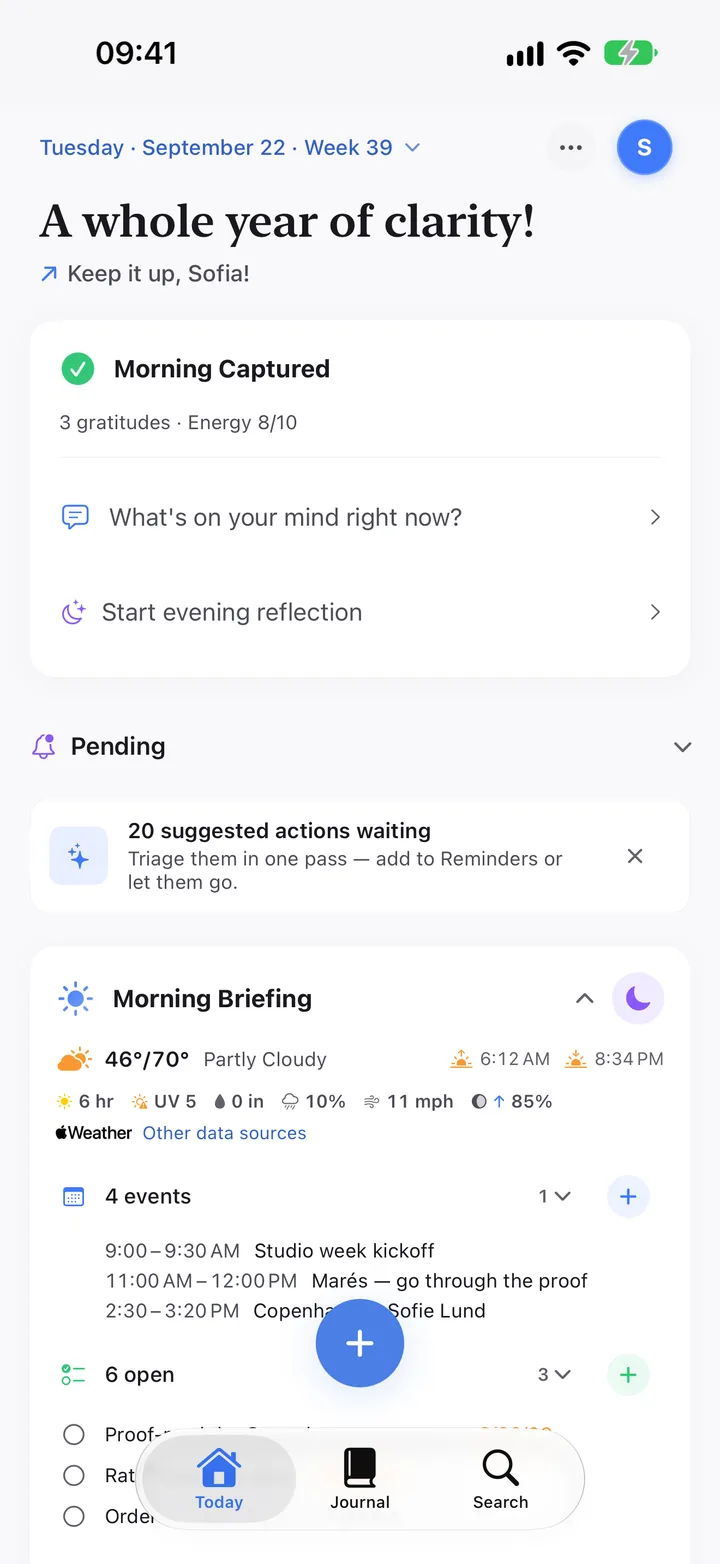
Today is for now. Journal is for what happened. Search is the way into everything else. The + for capturing floats on Today and Journal; in Search you type and choose New entry. Settings sit behind your avatar.

The Today tab with the capture button above the tab bar.
123456

Tab 1

Today

What the day needs, and nothing else.

  1. The date opens a calendar. Your avatar opens Settings.
  2. The next step: Morning Reflection, a thought, Evening Reflection, then Day Complete.
  3. Pending: at most two things that need you, like a review that is due.
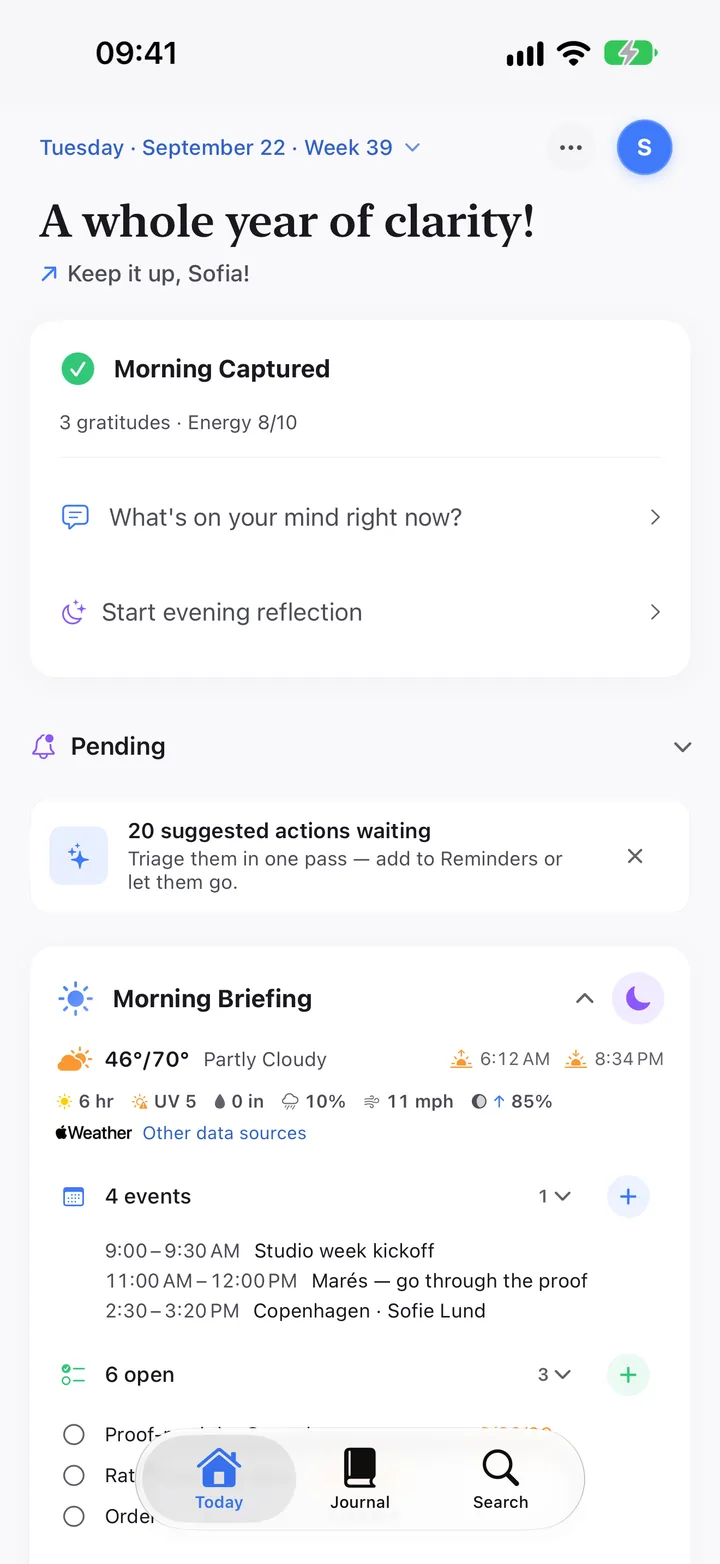
  4. Morning Briefing: weather, meetings, reminders, birthdays, who is due.
  5. The +: tap to write, hold for more.
  6. The three tabs. Swipe sideways to switch.

Further down: your Health Rail, Vision and Mindfulness. Customize reorders or hides any of them.

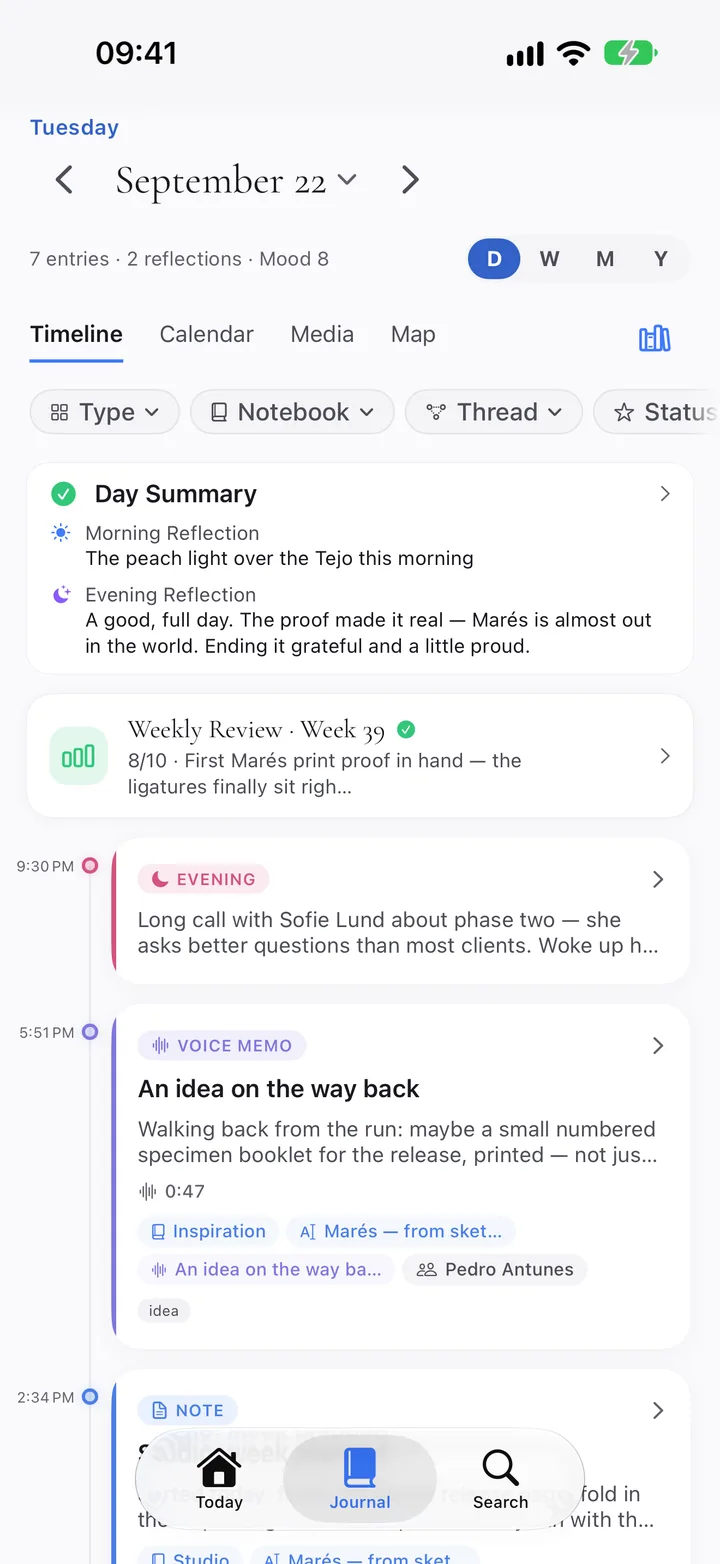
The Journal tab showing one day.
123456

Tab 2

Journal

Everything you kept, on the day it happened.

  1. Zoom out: Day, Week, Month, Year.
  2. Four views: Timeline, Calendar, Media, Map.
  3. Filter by type, notebook, thread or status.
  4. Day Summary opens the day: sessions, sleep, activity, weather.
  5. A finished review shows up on its day.
  6. Every entry in time order. Voice memos keep their transcript.
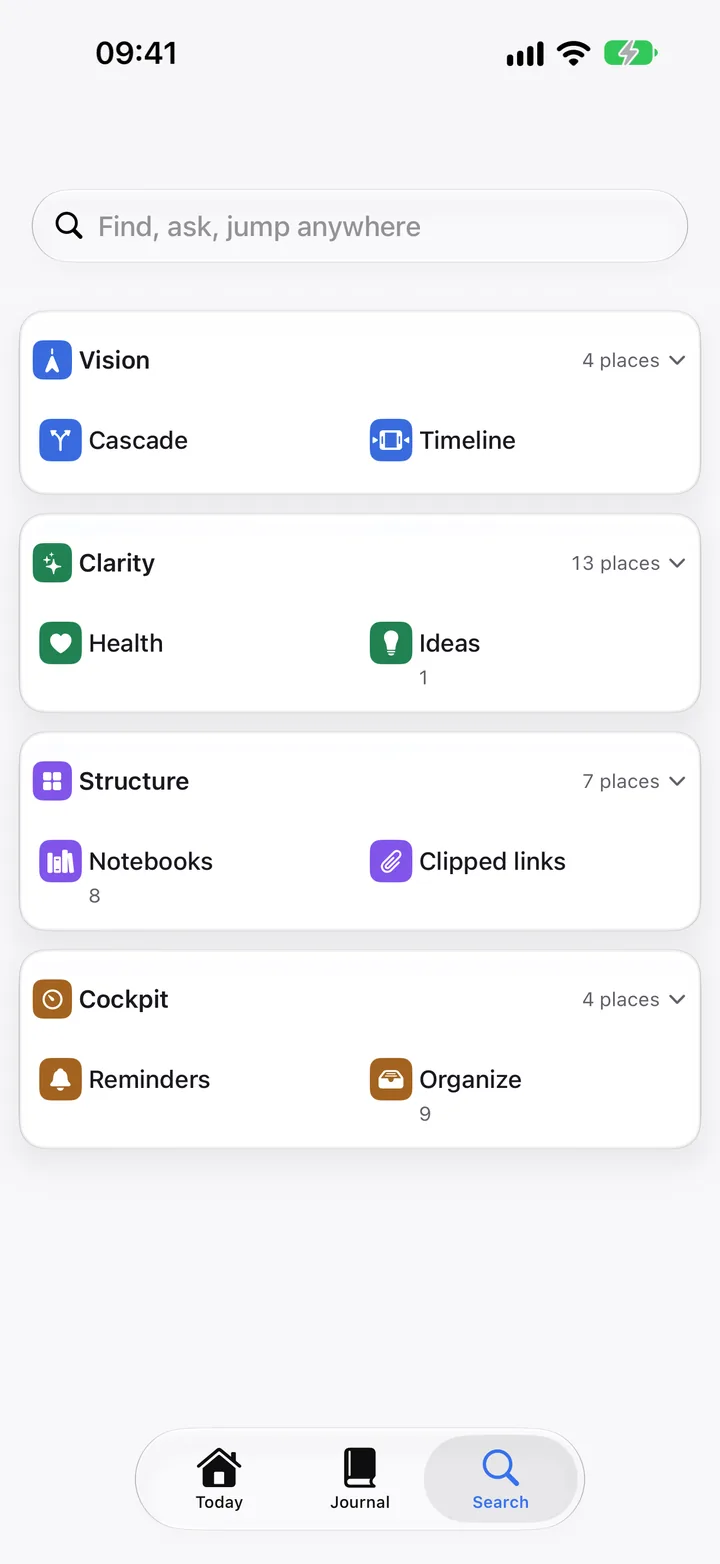
The Search tab at rest, showing the four areas of the app.
12345

Tab 3

Search

One field for every place, entry and question.

  1. Type to jump, find, act or create. Or Ask Clarivio.
  2. Vision: Goal Cascade, Life Timeline, Compass, My Heritage.
  3. Clarity: health, mindfulness, habits, insights, thinking, reviews.
  4. Structure: notebooks, threads, templates, clipped links, media, tags.
  5. Cockpit: reminders, Organize, calendar, network.
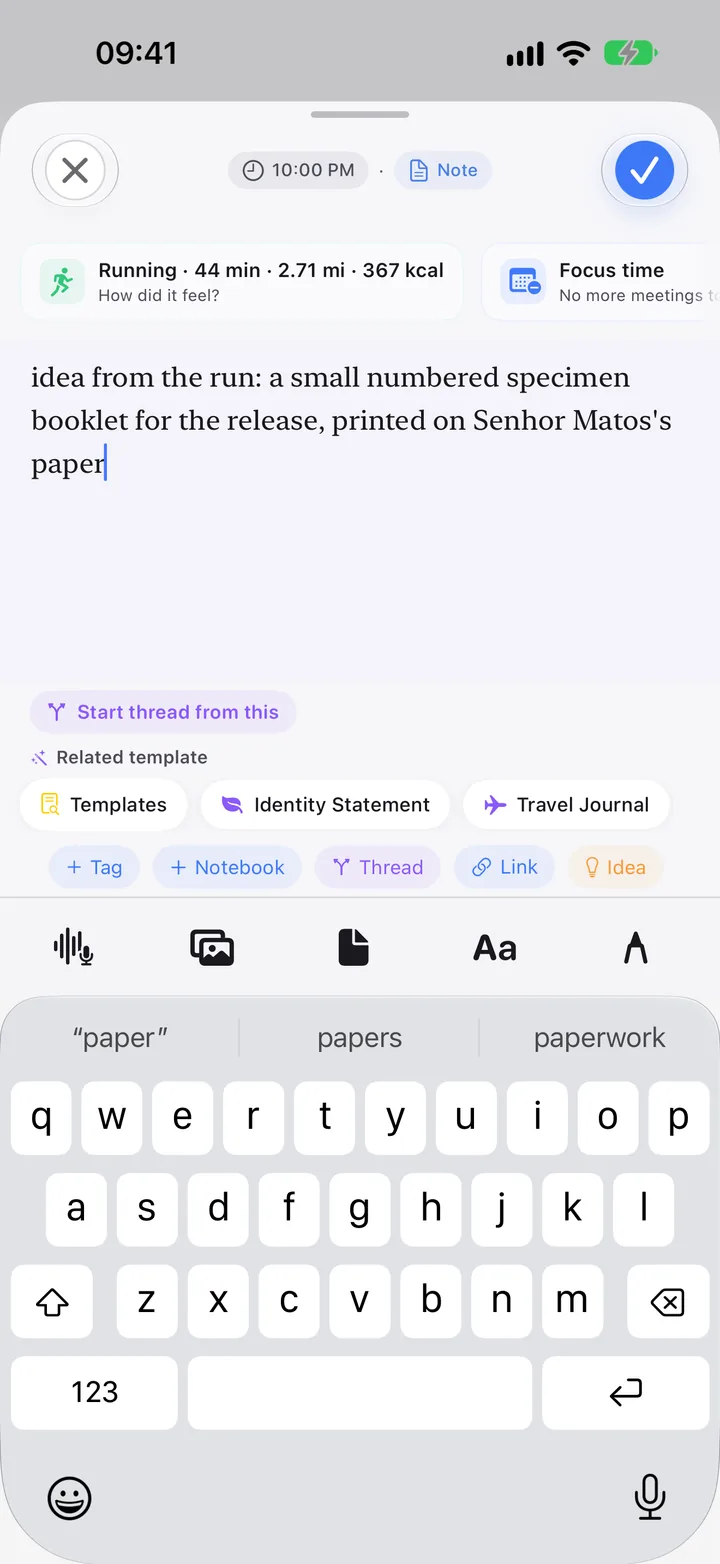
The capture sheet with a note being written.
123456

The + on Today and Journal

Capture

From thought to entry in seconds.

  1. Time and type are set for you. When? moves it to another day.
  2. The moment comes along: the run you just finished, the focus block you are in.
  3. Write. Formatting shows as you type.
  4. A template that fits, or start a thread from this.
  5. Tag, notebook, thread, link, idea. All optional.
  6. Voice, photos, a file, formatting, handwriting.

Three ways to open Capture

Tap +Quick Capture opens, keyboard up.
Hold +Text, Voice, Camera, Photo Library, Scan or Audio.
Swipe upThe camera opens straight away.

Also from the share sheet in any app, Apple Watch, Siri, widgets, Control Center and the Action button. In Search, type and choose New entry.

Settings · tap your avatar

  • Customize Today, daily rhythm and notifications.
  • App Lock: Face ID, PIN or both. Locked widgets hide what you wrote.
  • What leaves this device, permissions, the activity log.
  • iCloud sync, backup, and Export Everything (ZIP).
  • Settings apply to the device you set them on.

04Everywhere you are

One journal, on every device.

Clarivio syncs through your own iCloud. Every entry, photo, scan, voice note and document reaches all your devices.

iPad and Mac

iPadOS 26.4 · Mac with Apple silicon
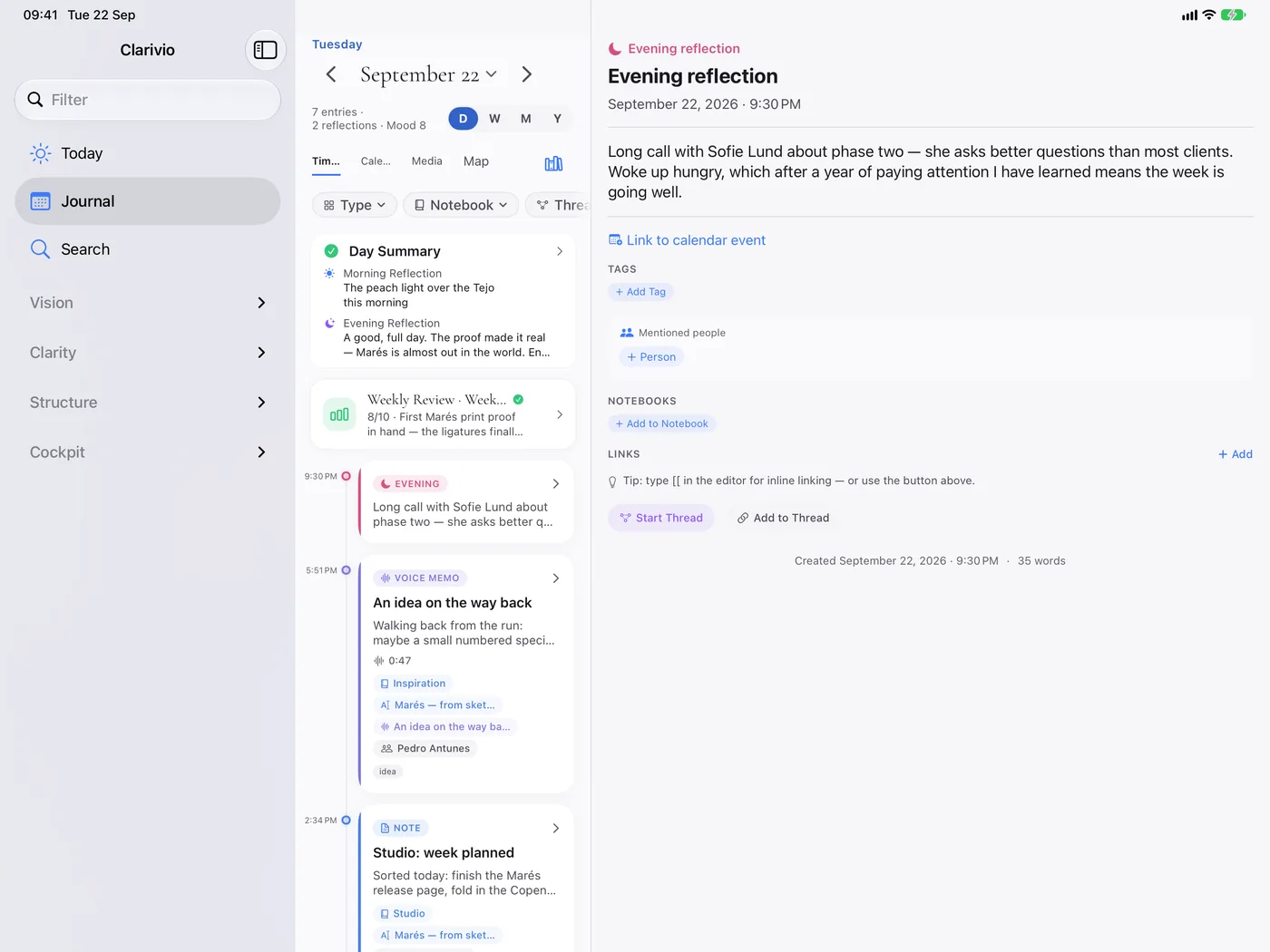
Clarivio on iPad: a sidebar, the day’s timeline and an open entry side by side.
  • Everything the iPhone does, with a sidebar. Each tab is a split view: the list, and the entry beside it.
  • Apple Pencil: draw or write by hand. Handwriting becomes searchable text.
  • Keyboard: ⌘N capture, ⌘K every screen, ⌘F search, ⌘1–3 tabs.
  • On a Mac, Clarivio runs as this iPad app; Apple Health is not available there.

Apple Watch

watchOS 26.4 · with your iPhone
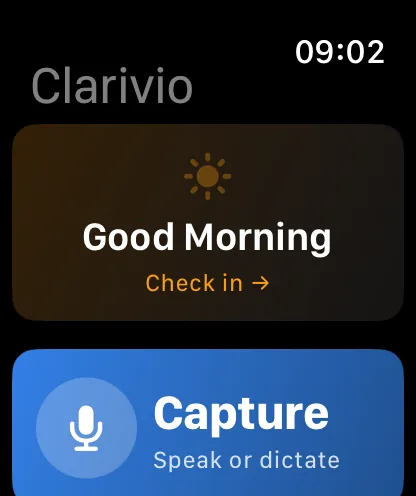
Watch: Good Morning check-in and Capture by voice.
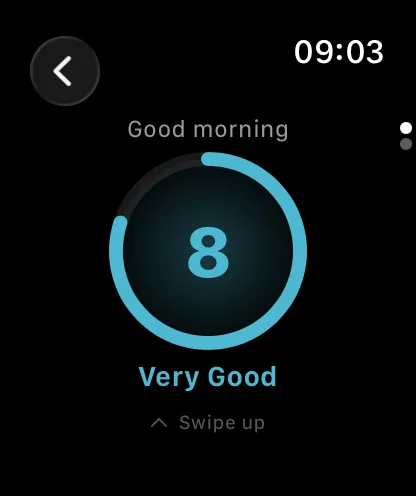
Watch: mood check-in showing 8, Very Good.
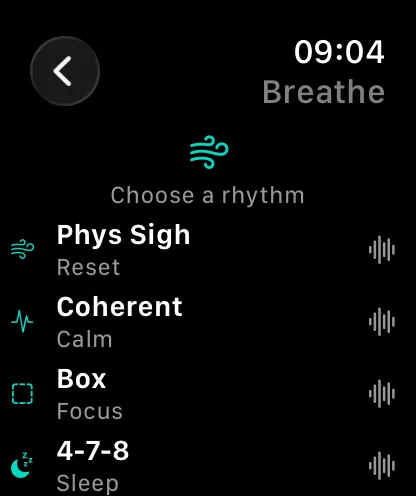
Watch: choose a breathing rhythm.
  • Morning and evening check-in, and a quick mood log.
  • Capture: speak a moment, an idea or a decision.
  • Breathe: Physiological Sigh, Coherent, Box, 4-7-8, plus guided body scans. It keeps going with your wrist down.
  • Tick habits, check your readiness, record your take on the newest clip.
  • Complications: Readiness, Next, Quick Capture, Breathe.
DeviceRequiresBest forNot there
iPhoneiOS 26.4 or laterEverything: capture, sessions, reviews, plans, peoplenothing missing
iPadiPadOS 26.4 or laterReviews, planning, reading back, writing at lengthnothing missing
MacMac with Apple siliconWriting, organizing and planning at a deskApple Health data, Watch features
Apple WatchwatchOS 26.4, paired iPhoneCapture by voice, check-ins, habits, BreatheReading the journal, reviews, plans

AI-written parts need Apple Intelligence (iPhone 15 Pro or newer). Without it, Ask answers from your matches and search works in full.

05Widgets and controls

Clarivio, one glance away.

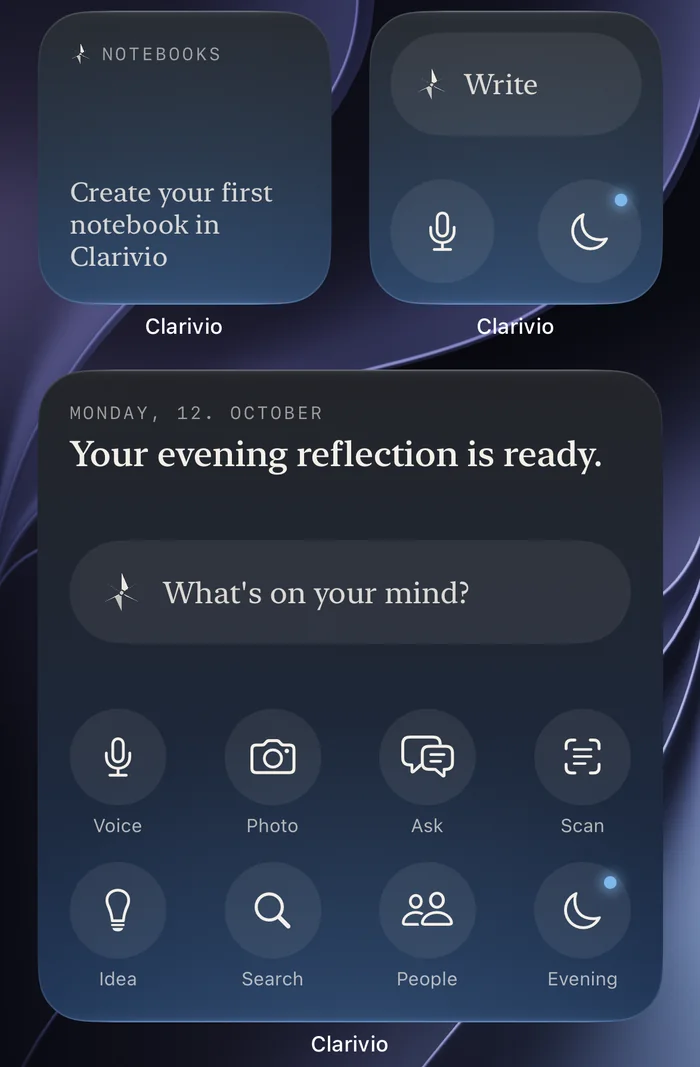
Four widgets, four jobs: start something, see the day, keep people close, remember. Plus controls for Control Center and the Action button.

Start in small and large on a dark Home Screen, beside Notebook Shortcuts.

Start

Begin anything

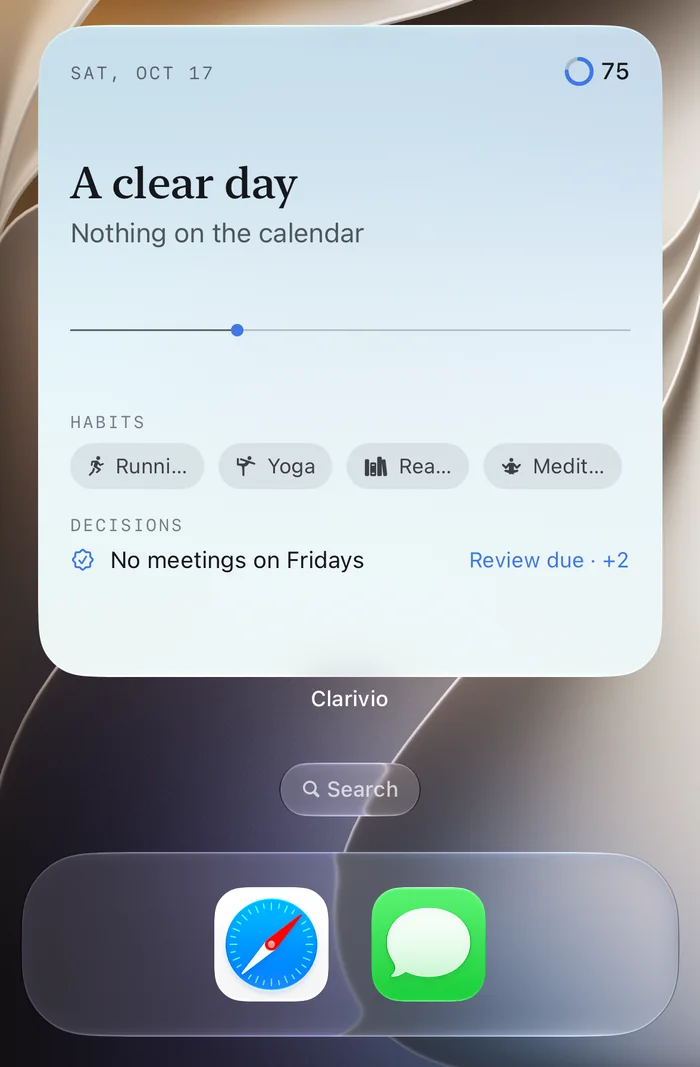
Write, speak, photograph or ask in one tap. 2, 4 or 8 buttons, chosen for you or by you, including any room like Habits or Notebooks.

The Today widget, large: the day in one line, readiness 75, four habits and a decision due for review.

Today

See the day

Your day on one line, and what comes next. Tick a habit right on the widget. Also on the Lock Screen.

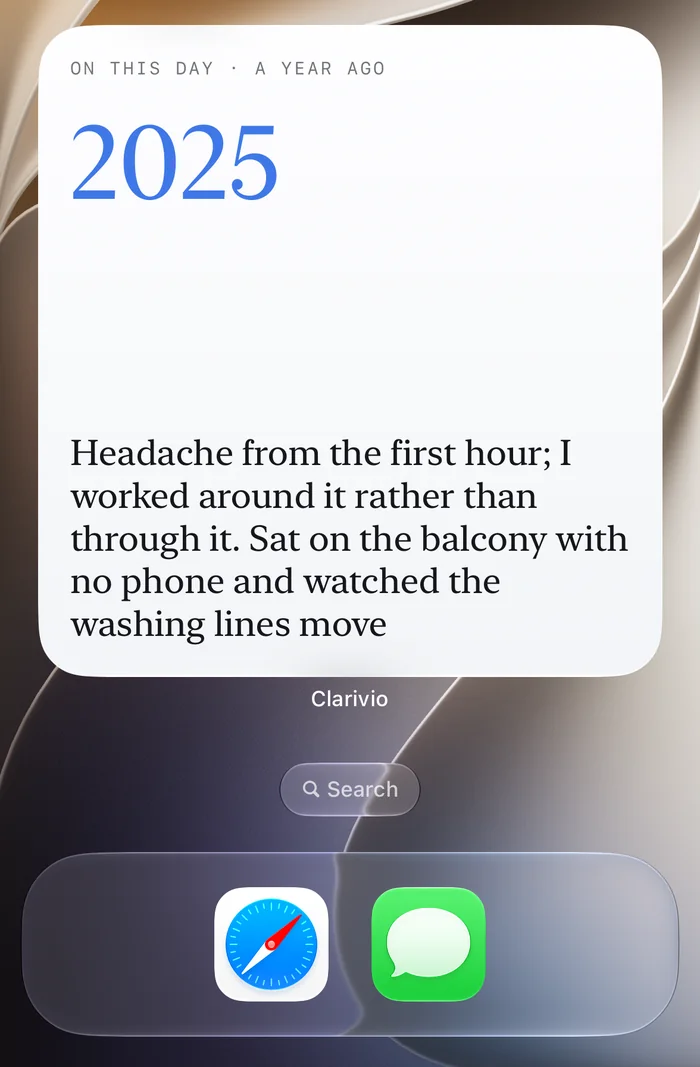
The Moments widget, large: what was written on this day a year ago.

Moments

Remember

Your journal, on its day: what you wrote a year or two ago.

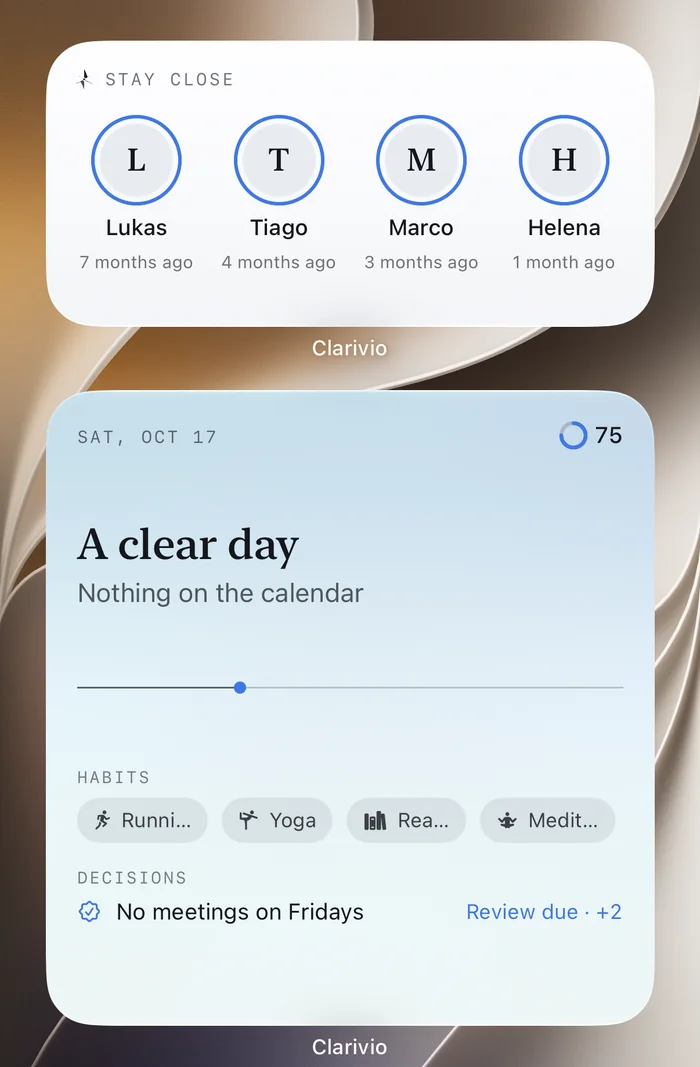
The Stay Close widget, medium: four people and how long ago you were last in touch, above the Today widget.

Stay Close

Keep people close

Who is due for a call or message, from your circles.

QuoteA line worth keeping, every day.
Notebook ShortcutsYour top four notebooks, one tap away.
Lock ScreenQuick Capture, Clarivio and Readiness circles.
Control CenterWrite, Voice Note, Scan Document, Breathe, Record My Take.

When App Lock is on, widgets hide what you wrote. In StandBy, the small widgets show and Today turns dark.

06What Clarivio does

Seven use cases, one loop.

Each use case lives on its own time horizon. They meet in the daily sessions and the reviews: each one hands something to your rhythm and gets something back.

01 · Memory5 s → years

Capture everything.

Seconds to save, a minute to make it yours, found again years later.

  • Text, voice, photo, scan, or a clip from any app’s share sheet.
  • The moment comes with it: the time, the place, the run, the meeting.
  • Every clip gets your take, in your own words.
  • File it, or tap No filing needed. Search finds it anyway.

Pays off: on day one. Your first takes come back about six weeks later.
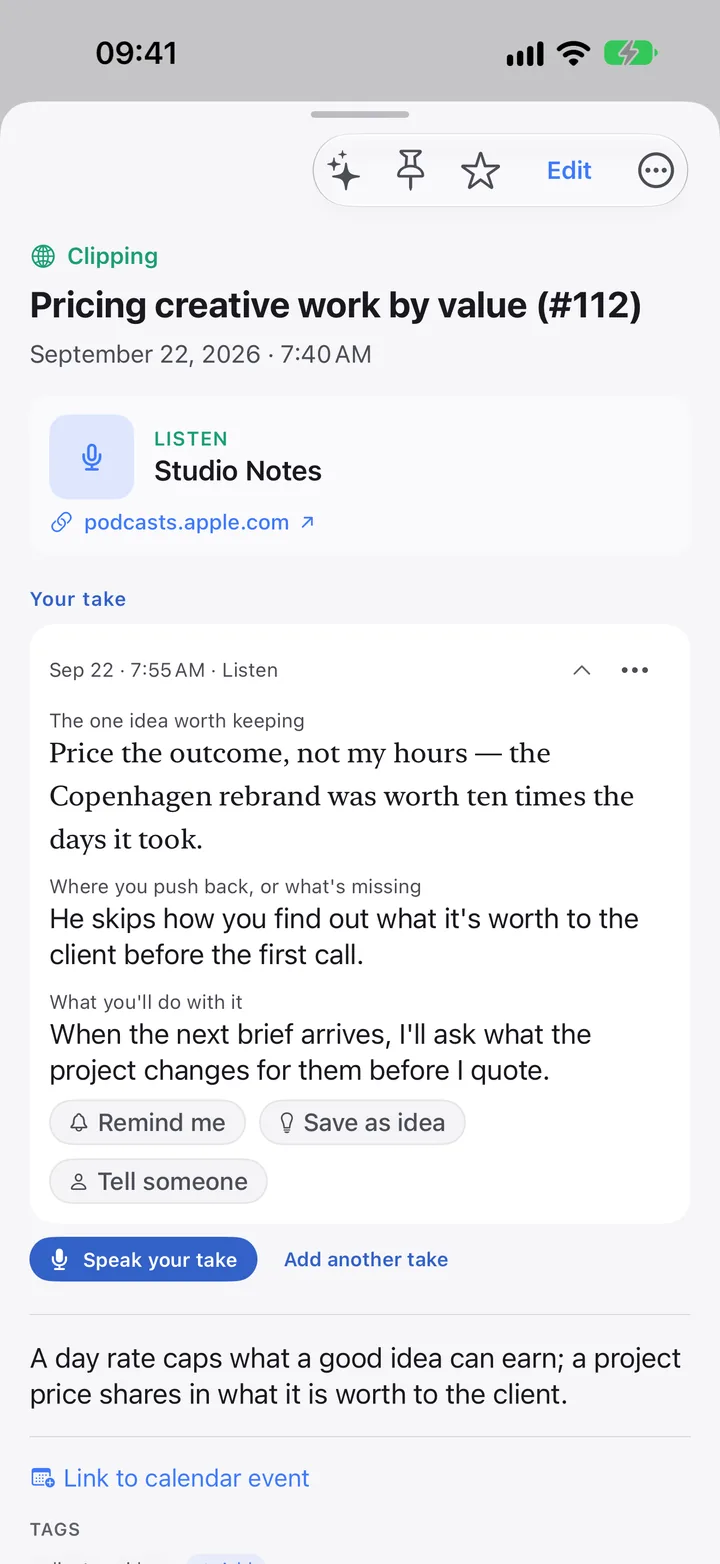
A clipped podcast episode with the user’s take.
02 · Memorya week → 2 years

Think it through.

Catch ideas, name challenges, make the call, and learn how good your calls are.

  • Ideas wait in an inbox, then get tested, parked or let go.
  • Name a challenge and what would settle it. Check in weekly.
  • Write a decision with how likely you think it is. Review it later.
  • Your calibration after five resolved forecasts.

Pays off: at your first decision review, 30 days or more in.

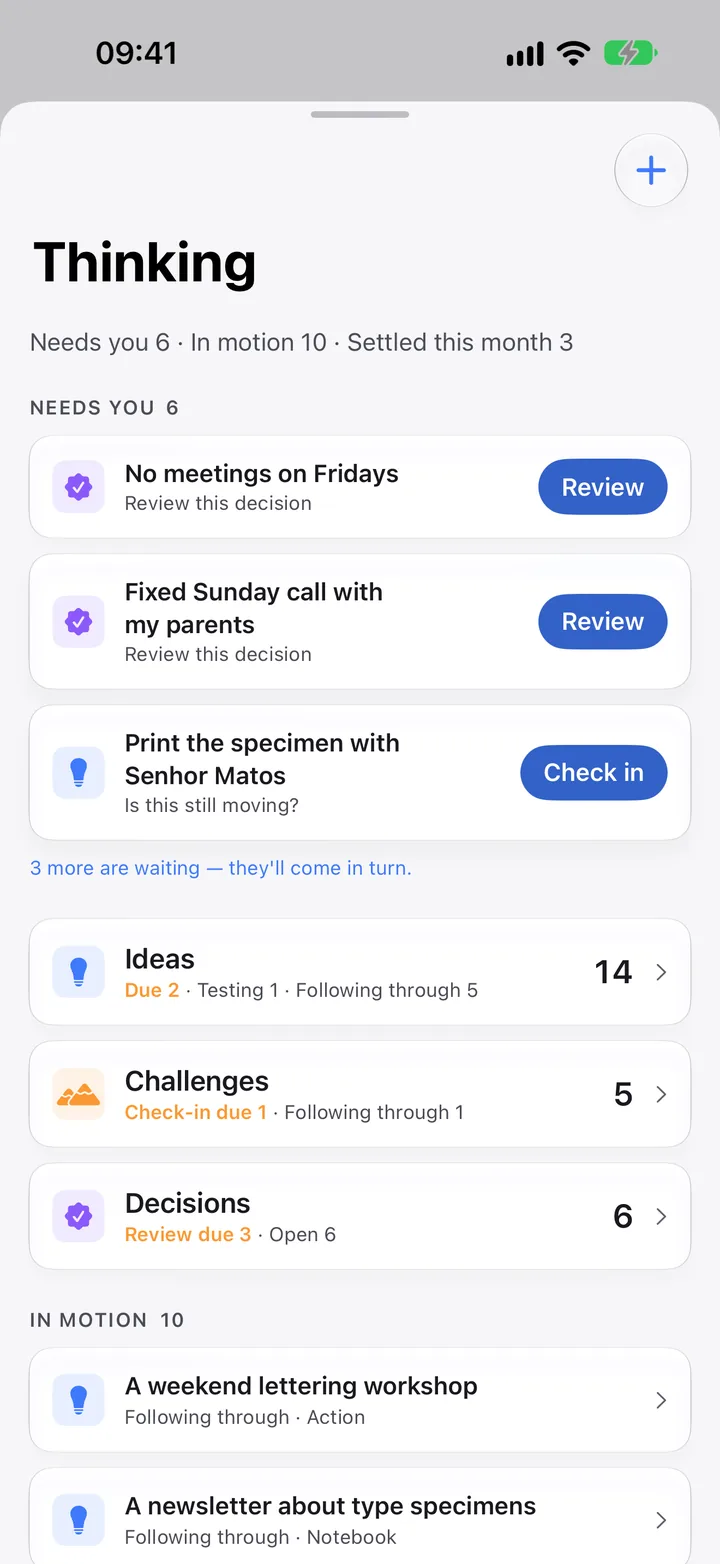
The Thinking home: what needs you, ideas, challenges and decisions.
03 · Rhythm7 → 365 days

Understand body and mind.

See what really moves your energy, mood and focus.

  • Sleep, HRV and workouts arrive from Apple Health. With an Apple Watch, a Readiness score each morning.
  • Mood and energy in a tap; breathing practices for five states.
  • Habits with a weekly goal, so a rest day never breaks them.
  • Insights after 14 paired days, tested so chance doesn’t look like a pattern.

Pays off: readiness from week one; patterns from about two weeks.

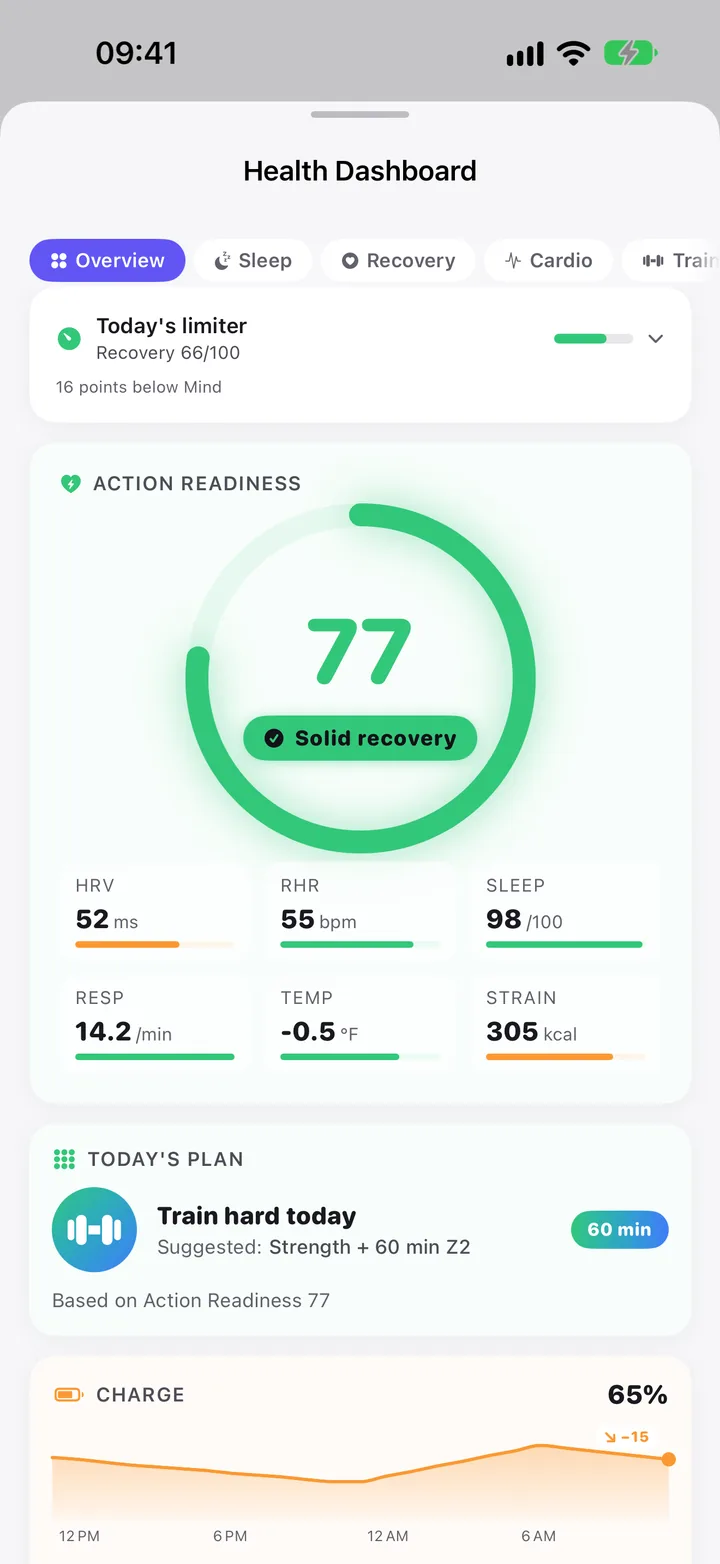
The Health Dashboard with a readiness of 77, Solid recovery.
04 · Directionquarter → 10 years

Set your course.

Your values, a ten-year picture and this quarter’s key results.

  • Compass: purpose, vision, values, mission, legacy.
  • Goals in six life areas: Career, Health, Relationships, Finances, Growth, Lifestyle.
  • Each quarter: up to three focus areas, each with three key results.
  • 10 years → 3 years → this year → this quarter, in one Goal Cascade.

Pays off: when this quarter’s goals start showing up in your mornings.

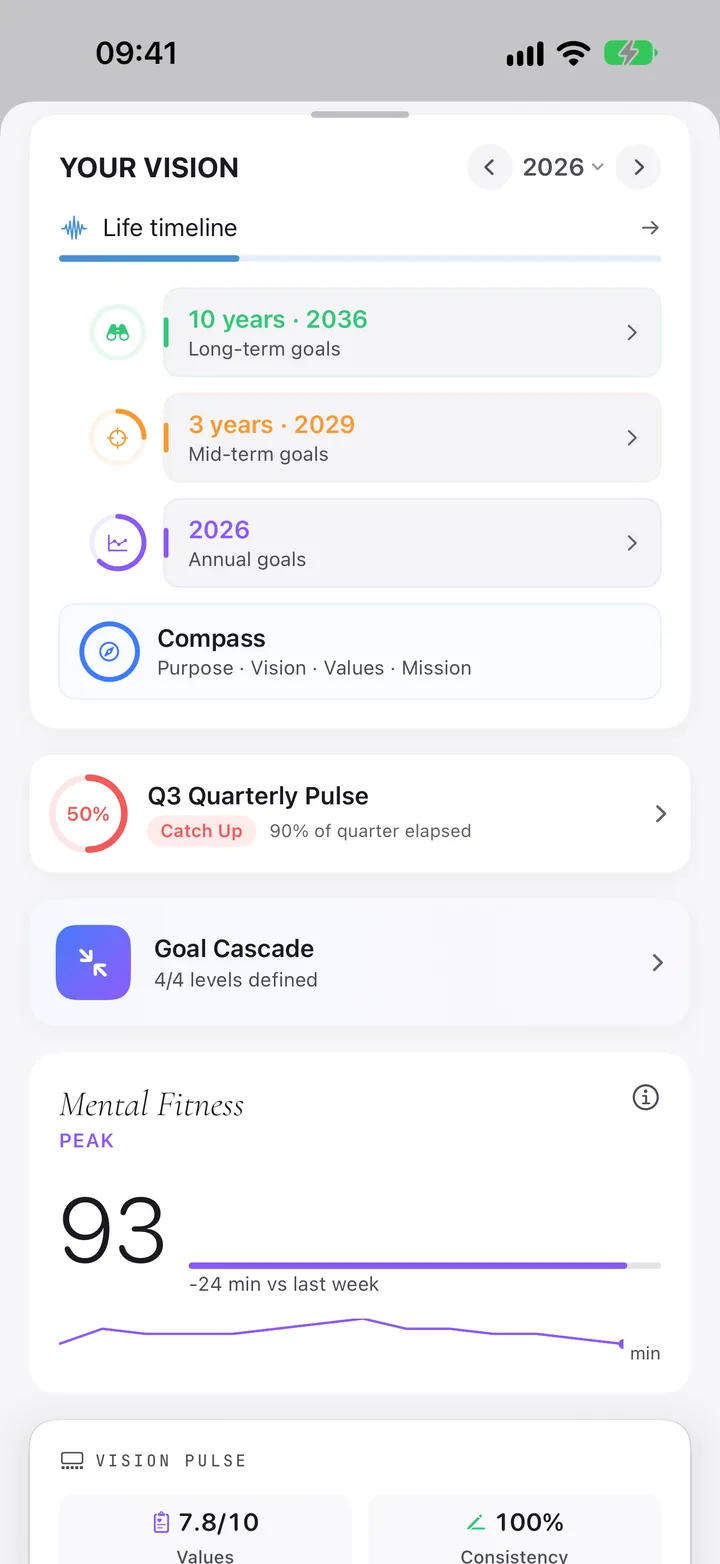
Your Vision: 10-year, 3-year and annual goals, the Compass and the Goal Cascade.
05 · Directionyears → generations

Know your story.

Your course is what you declare. Your story is the evidence.

  • Life Timeline: your life by decade, with chapters and one photo per year.
  • A letter to your future self, sealed until an age you choose.
  • My Heritage: a family tree, with memories and who told them.
  • Year Wrapped and Your Year in Words, from what you kept.

Pays off: at the end of your first year, and every year after.

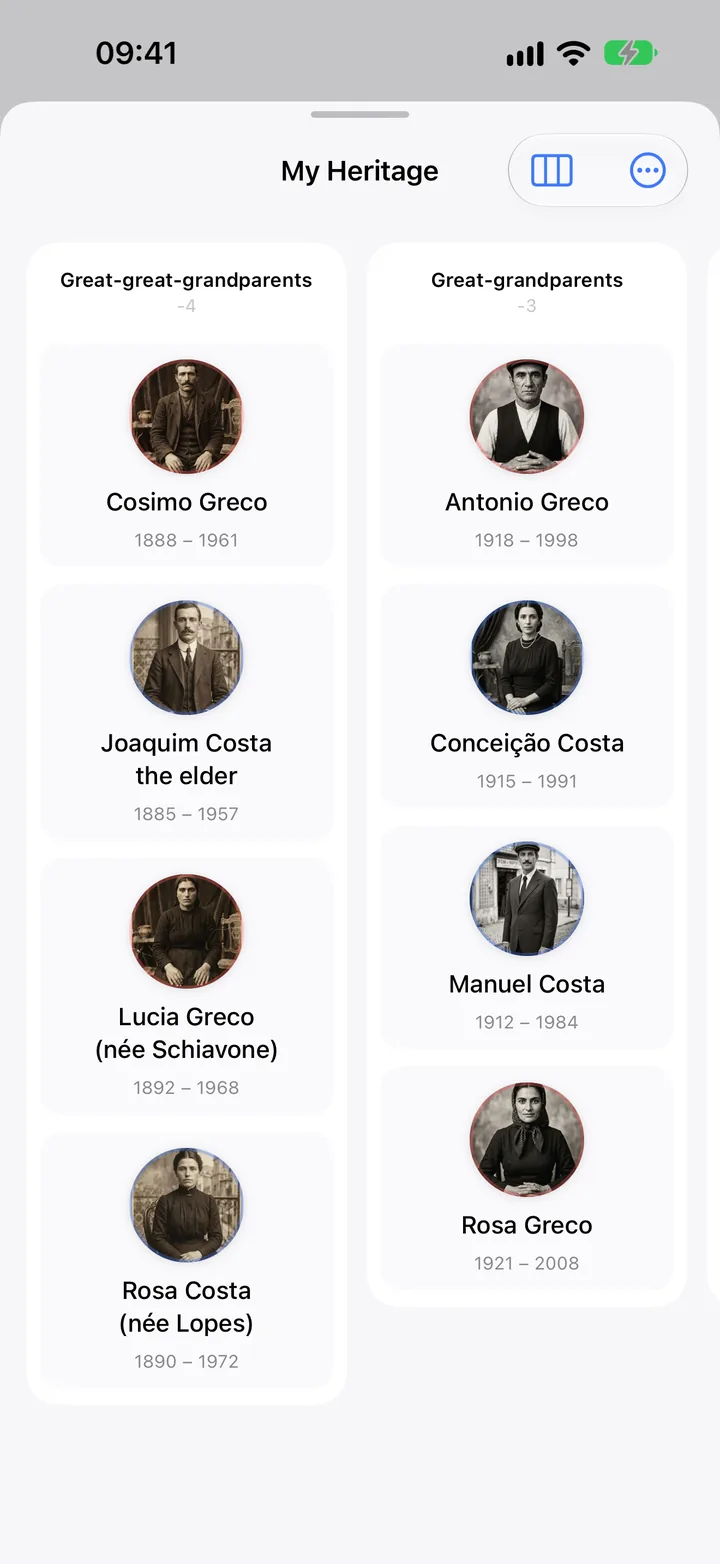
My Heritage: a family tree across generations.
06 · Rhythmday → year

Plan and reflect.

From this morning to the end of the year. Each review sets up the next stretch.

  • Morning and evening: Quick ~90 sec, Normal 5–8 min, Deep 10–15 min.
  • Weekly, monthly, quarterly and yearly reviews, about 9½ hours a year.
  • Each review opens with what the period actually held.
  • A letter for each week, month, quarter and year, written on your device.

Pays off: after your first weekly review.

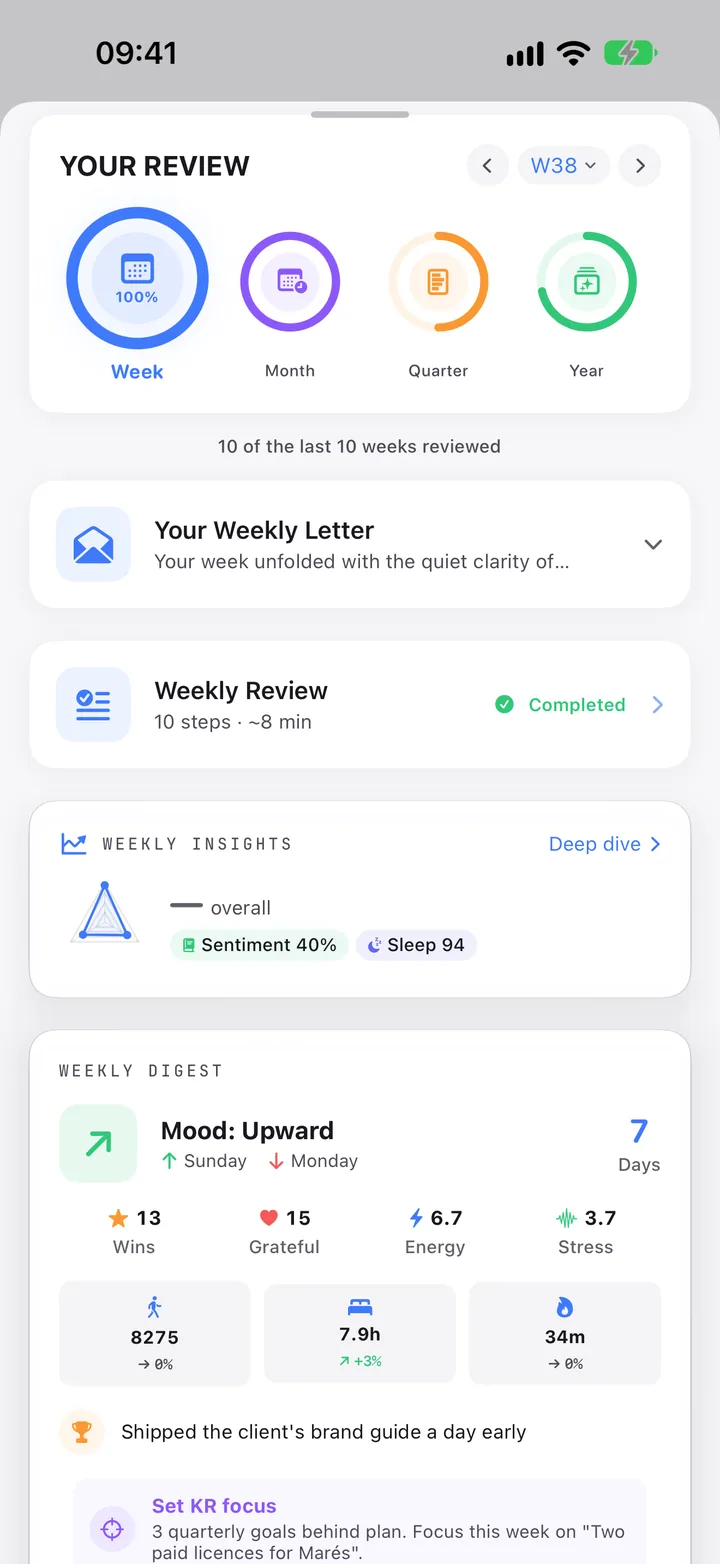
Your Review: week, month, quarter and year, with the weekly letter.
07 · Rhythmweek → quarter

Stay close.

A private CRM for the people who matter, built on your Contacts.

  • Circles: Core 5, Inner Circle 15, Extended 50, Outer 150.
  • A contact rhythm per circle: 7, 14, 30 or 90 days, or your own.
  • Birthdays and who is due, in your morning briefing.
  • Call or message in one tap. Nothing is read from your messages.

Pays off: in week one, once your five closest people are linked.

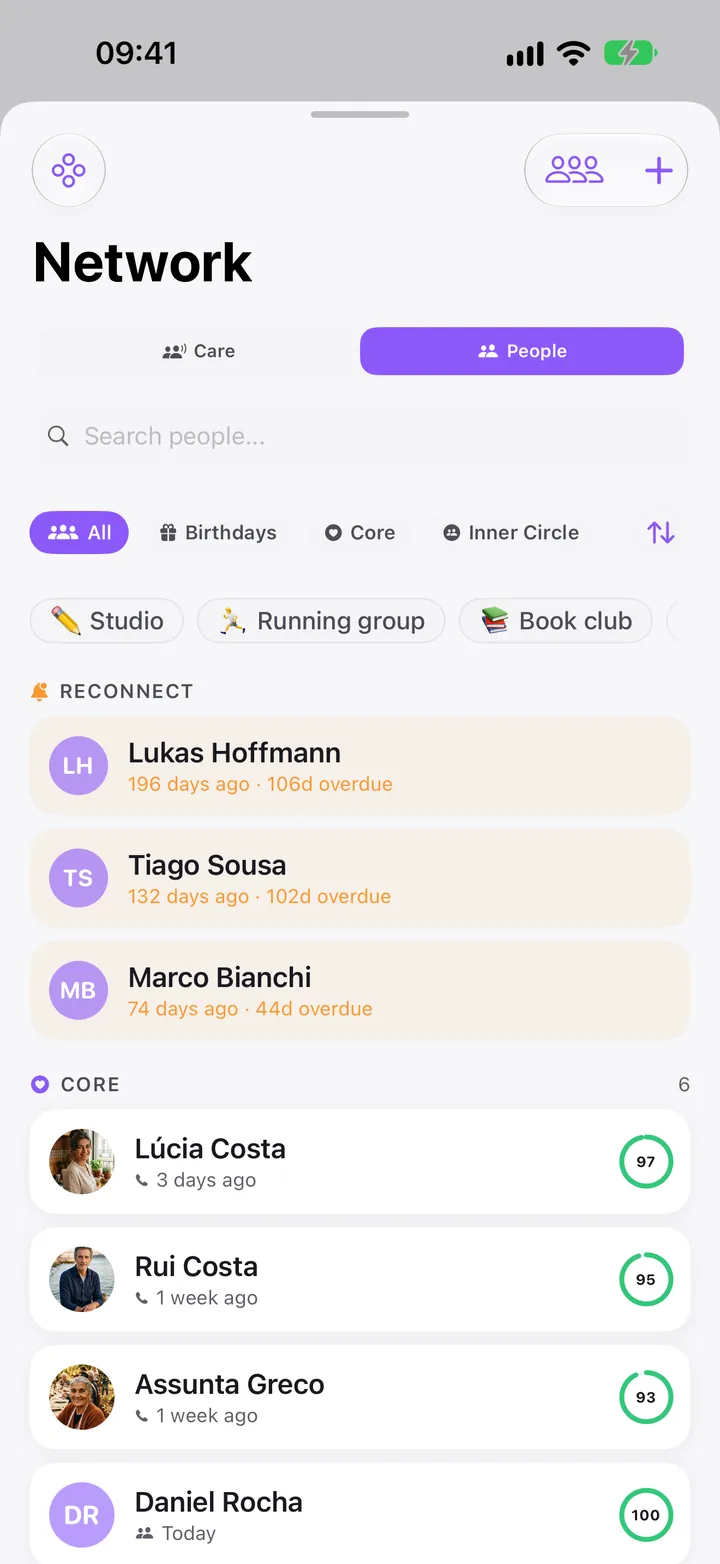
Network: people to reconnect with and your core circle.
Under all seven

Built on your Apple apps.

Your tasks stay in Reminders, your meetings in Calendar, your people in Contacts, your body in Health. Clarivio reads what it needs and writes only where you ask.

  • Calendar: your next meeting with your last note from it.
  • Reminders: tasks found in your notes wait until you send them.
  • Contacts: linked only when you pick a person.
  • Health: sleep, HRV, workouts in; mood and mindful minutes out.

Also: Photos, Notes, Files, Weather, Siri and Shortcuts, Spotlight, Handoff.

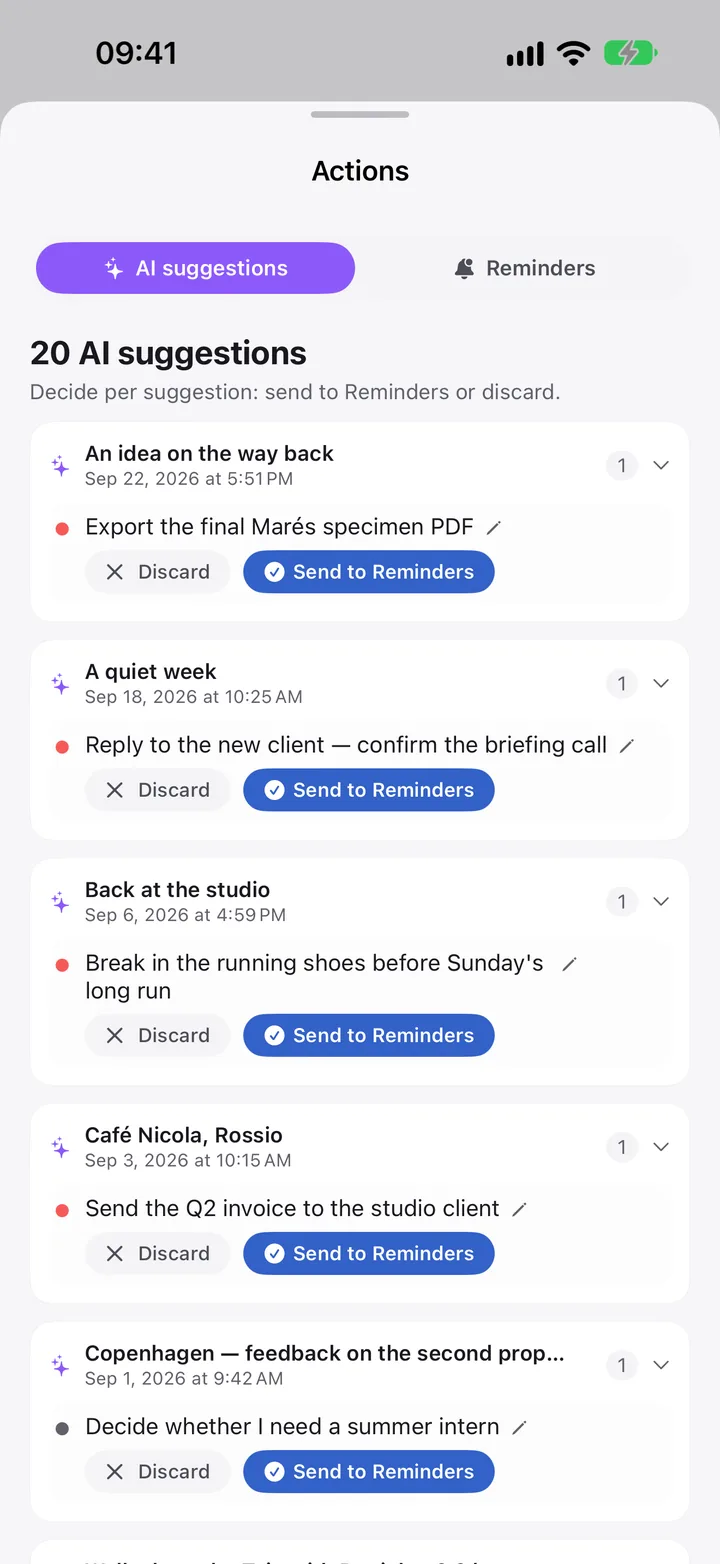
AI suggestions: tasks found in your notes, each with Discard or Send to Reminders.

07Journey · Plan and reflect

A year of clarity, step by step.

The planning side in full, from your values down to this morning and back up to your whole life. Every step is optional. Many people start with step 5 and add the rest when they want more direction.

The Weekly Letter at the end of a first weekly review, written from the week’s entries.
Your first weekly review · 22 seconds · sample data · also in the app, in How Clarivio works
1
Once · revisit each quarterSearch → Vision → Compass

Set your Compass.

  • The first time you open Vision, a short setup asks for one goal for this year, a few values and, if you like, where you want to be in ten years. Any page can be skipped.
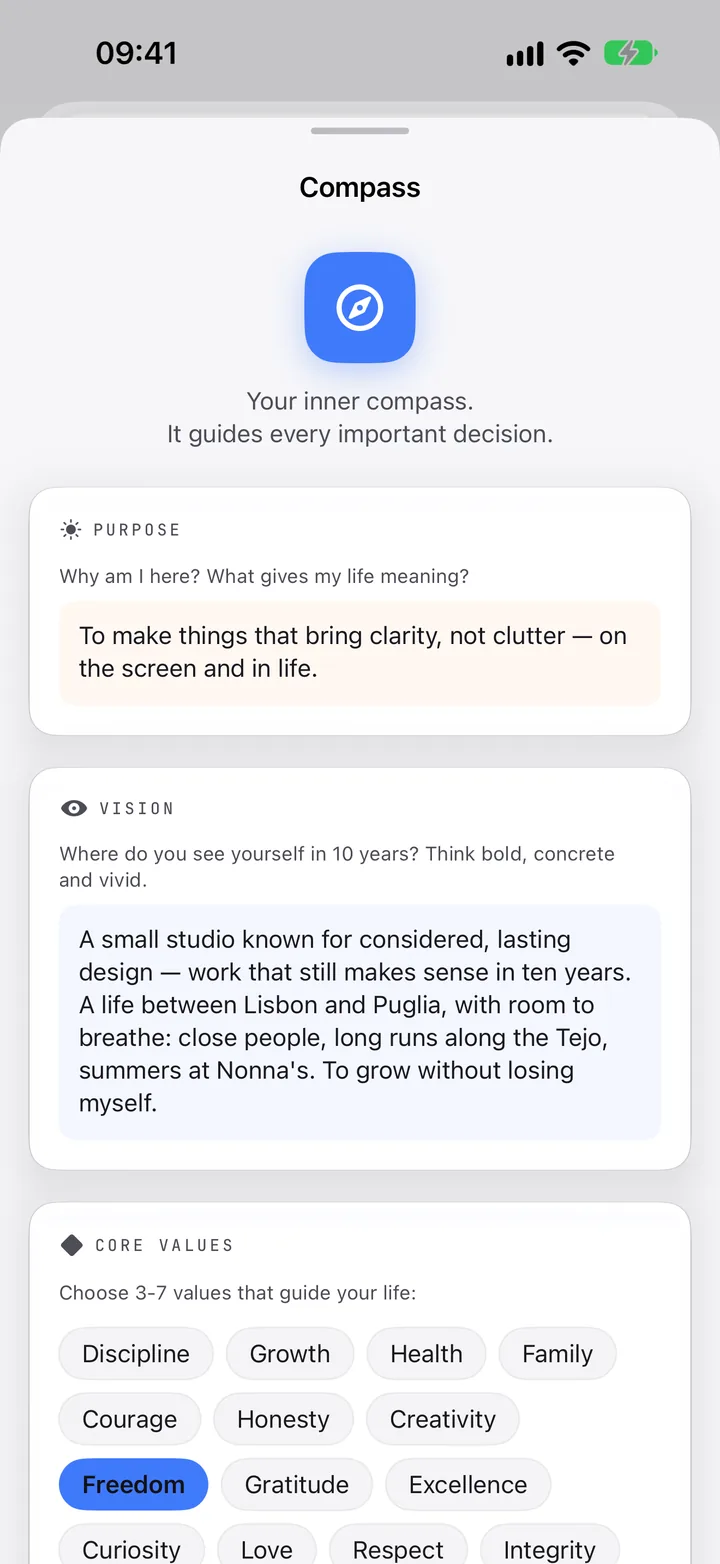
  • The Compass then holds it all on one page: purpose, vision, values with what each means to you, mission and legacy.
  • Once a week, rate how well you lived each value, 1 to 10. Values Alignment shows the trend.
The Compass: purpose, vision and core values.
2
Once a yearVision → My Year → Year Plan

Plan this year, area by area.

  • Six life areas: Career, Health, Relationships, Finances, Growth, Lifestyle. Plan only the ones that matter now.
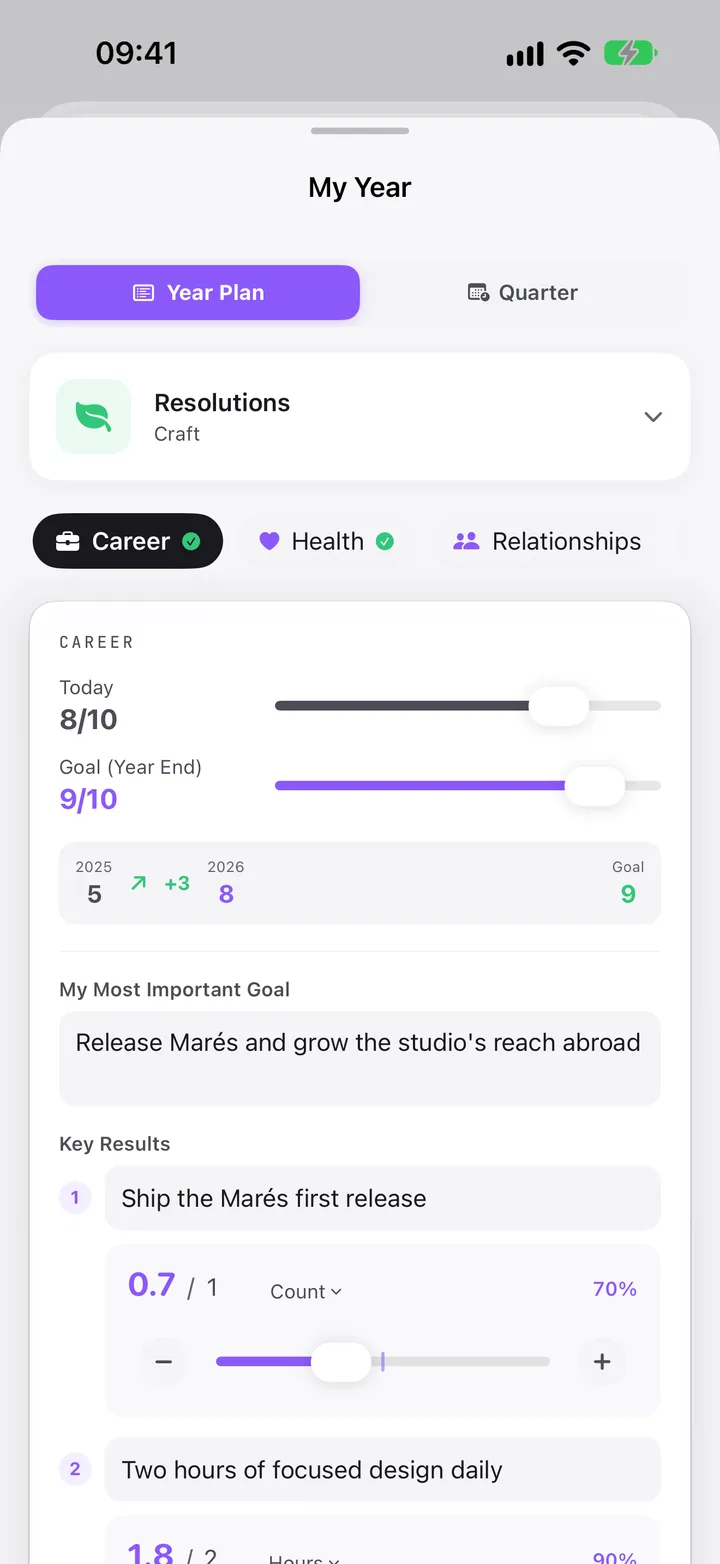
  • For each: where you are today and where you want to be, 1 to 10, your most important goal, up to three Key Results, and the habits that carry it.
  • Resolutions: a Word of the Year, plus more of this and less of this.
  • At New Year, Plan 2027 carries your goals over with progress reset. Keep what still fits.
My Year, Year Plan: resolutions and the Career plan with its key results.
3
Every quarterVision → My Year → Quarter

Break it into quarters.

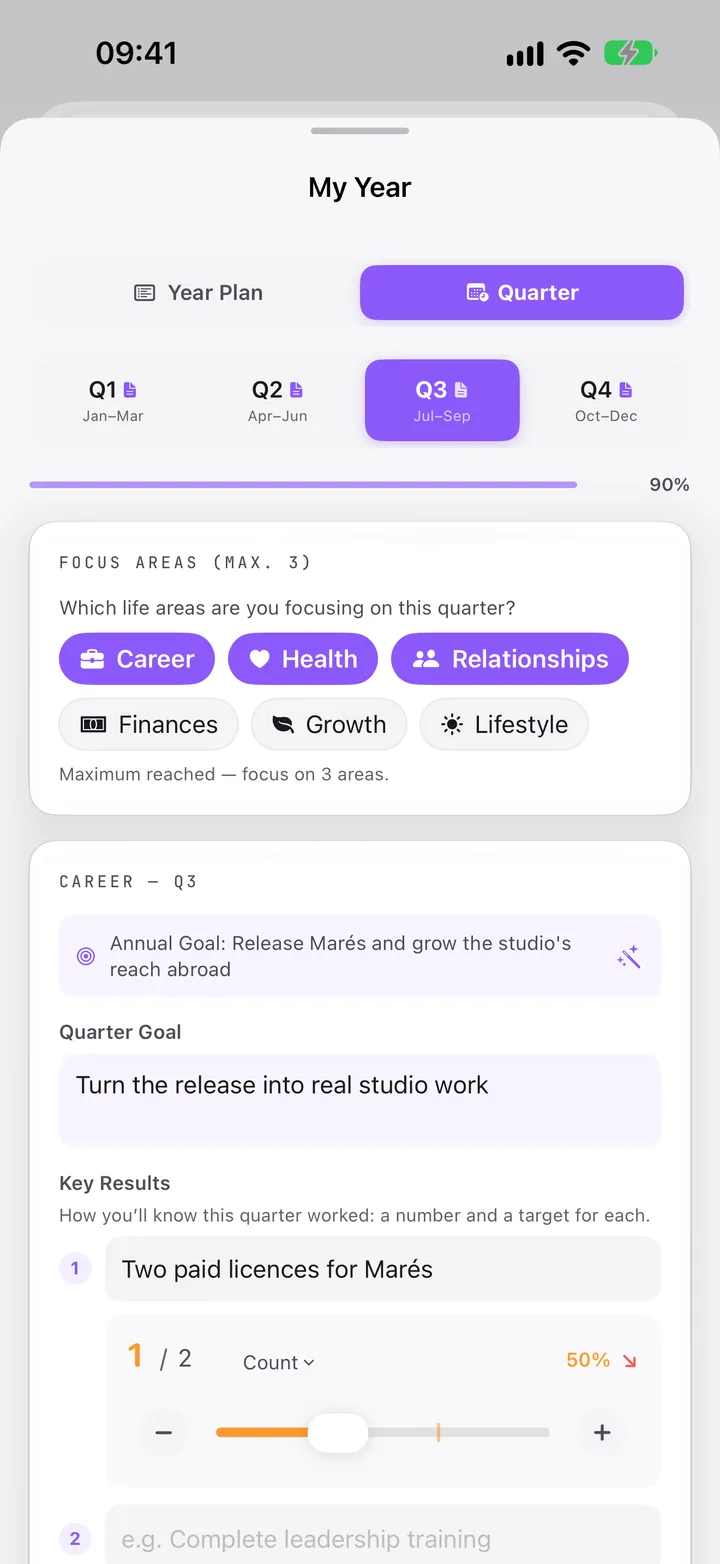
  • Choose up to three focus areas for the quarter.
  • Each gets a quarter goal and three Key Results: a number and a target for each.
  • Stuck? AI Quarter Breakdown suggests three, on your device.
  • From then on, the morning suggests them when it asks for today’s goals.
My Year, Quarter: Q3 focus areas and the Career quarter goal with its key results.
4
When you are readyVision → Goal Cascade

Look further: 3 years, then 10.

  • 3-Year Plan, per area: your vision, milestones for each year, what you need to do, possible obstacles.
  • 10-Year Plan, “Think Big”: the dream, and what would be good enough.
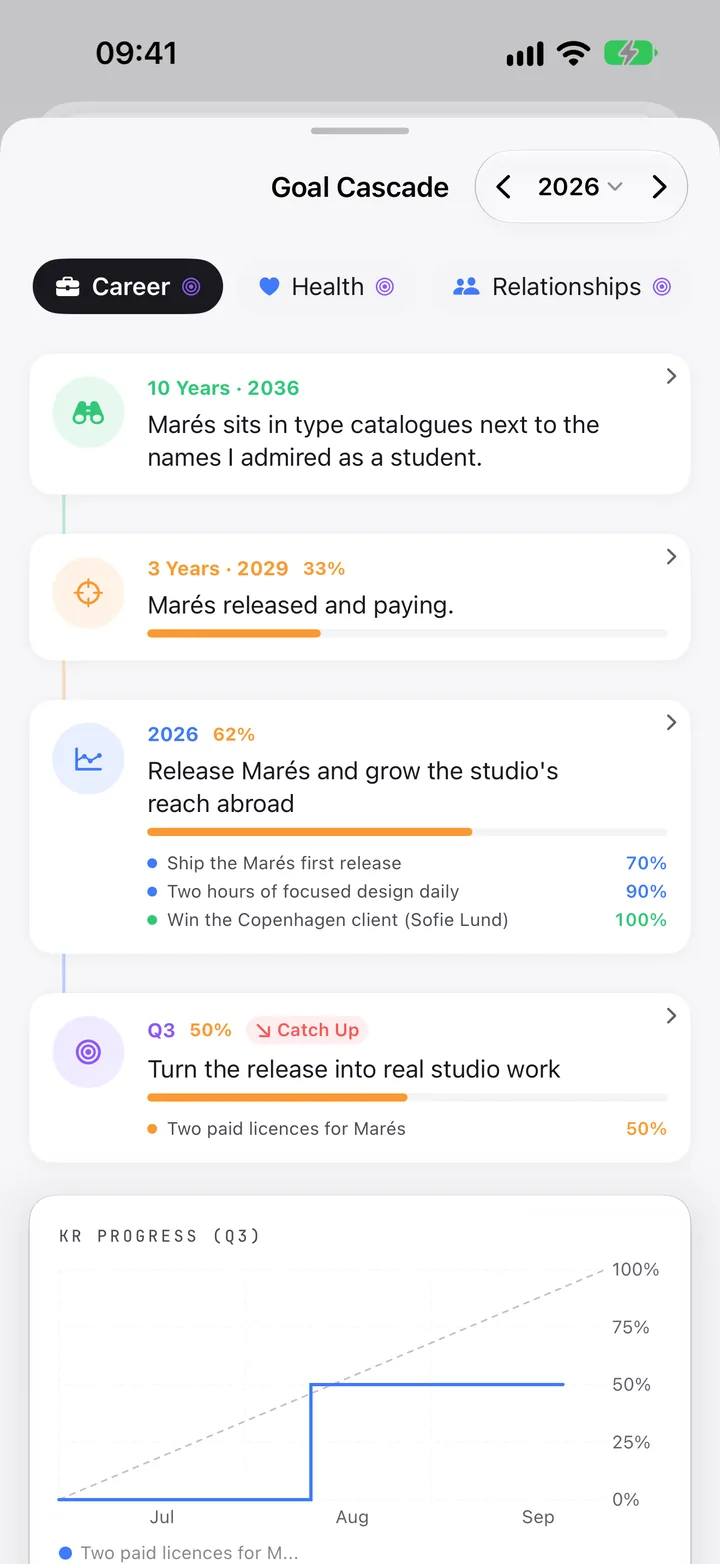
  • The Goal Cascade lines up all four levels for each area and marks the quarter Ahead, On Track or Catch Up.
Goal Cascade for Career: 10 years, 3 years, 2026 and Q3, with progress.
5
Every day · ~90 sec to 15 minToday → Morning Reflection · Evening Reflection

Begin and end the day.

Quick · ~90 sec
  • Morning: breathing, mood and gratitude
  • Evening: a win, mood, tomorrow’s focus
Normal · 5–8 min
  • Morning: breathing, goals and intention
  • Evening: wins, gratitude, habits, tomorrow
Deep · 10–15 min
  • Morning: meditation, reflection, journaling
  • Evening: deep reflection, journaling, planning
  • Clarivio asks How much time do you have? The evening card appears from 17:00.
  • A challenge you name in the morning comes back in the evening: how did it go?
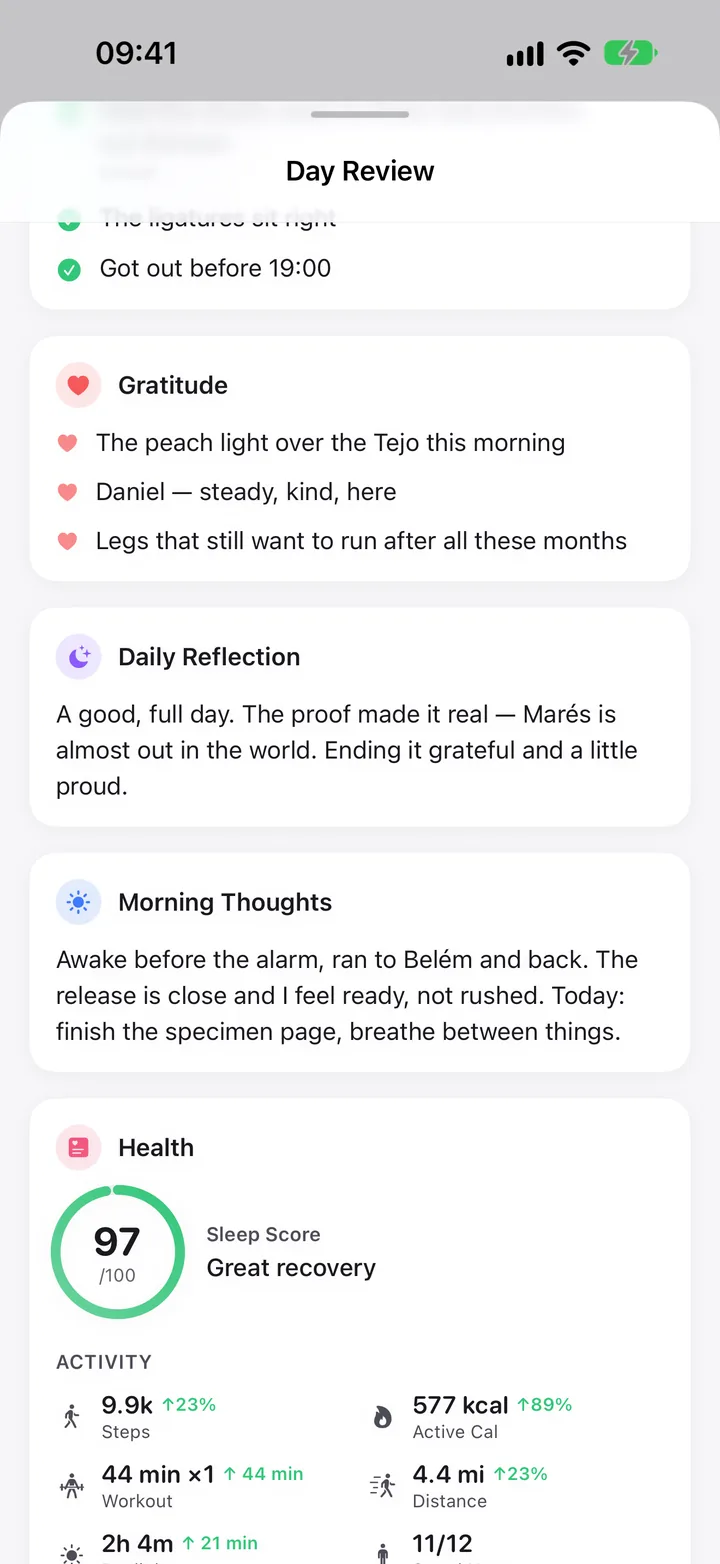
  • Then Day Complete: the Day Review holds the day with your words, sleep, activity, weather and place. The Journal keeps it as the Day Summary.
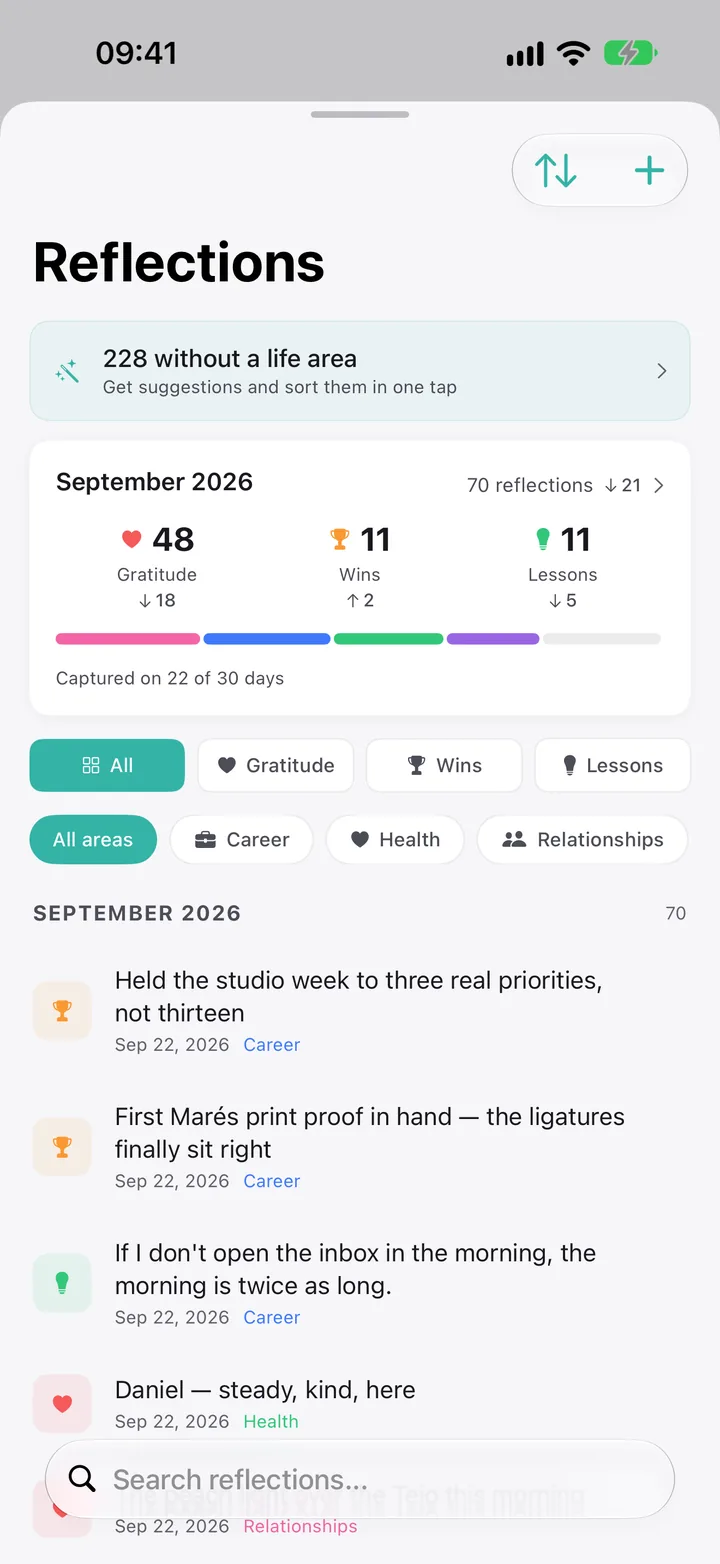
  • Wins, lessons and gratitude collect in Reflections, searchable and filtered by life area.
Day Review: gratitude, daily reflection and the day’s health.
Reflections: gratitude, wins and lessons for September, filtered by life area.
6
Every week · 10 steps · ~8 minToday → Pending, Sunday evening · Search → Clarity

Close the week.

Already there
  • Your week in mood, energy, sleep and steps
  • Wins from your evenings
  • Decisions you made
  • Habits, and this quarter’s results
You add
  • Your top one to three wins
  • One reflection question
  • + or − on each result
  • Values check, next week’s focus
Comes back
  • The review, on its day in the Journal
  • Top wins starred in Reflections
  • Results updated in your quarter
  • Your Weekly Letter

The prompt appears in Pending from Sunday 18:00 to Monday noon. The letter is written on your device, from your entries.

Your Review with the Weekly Letter and the completed Weekly Review.
7
Month · quarter · yearThe same screen, one zoom level out

The same loop, zoomed out.

Week10 steps · ~8 min

Wins, values, results, next week’s focus. A Weekly Letter.

Month11 steps · ~8 min

What defined the month, whether your intentions landed, “When X, I will Y” for the next.

Quarter8 steps · ~10 min

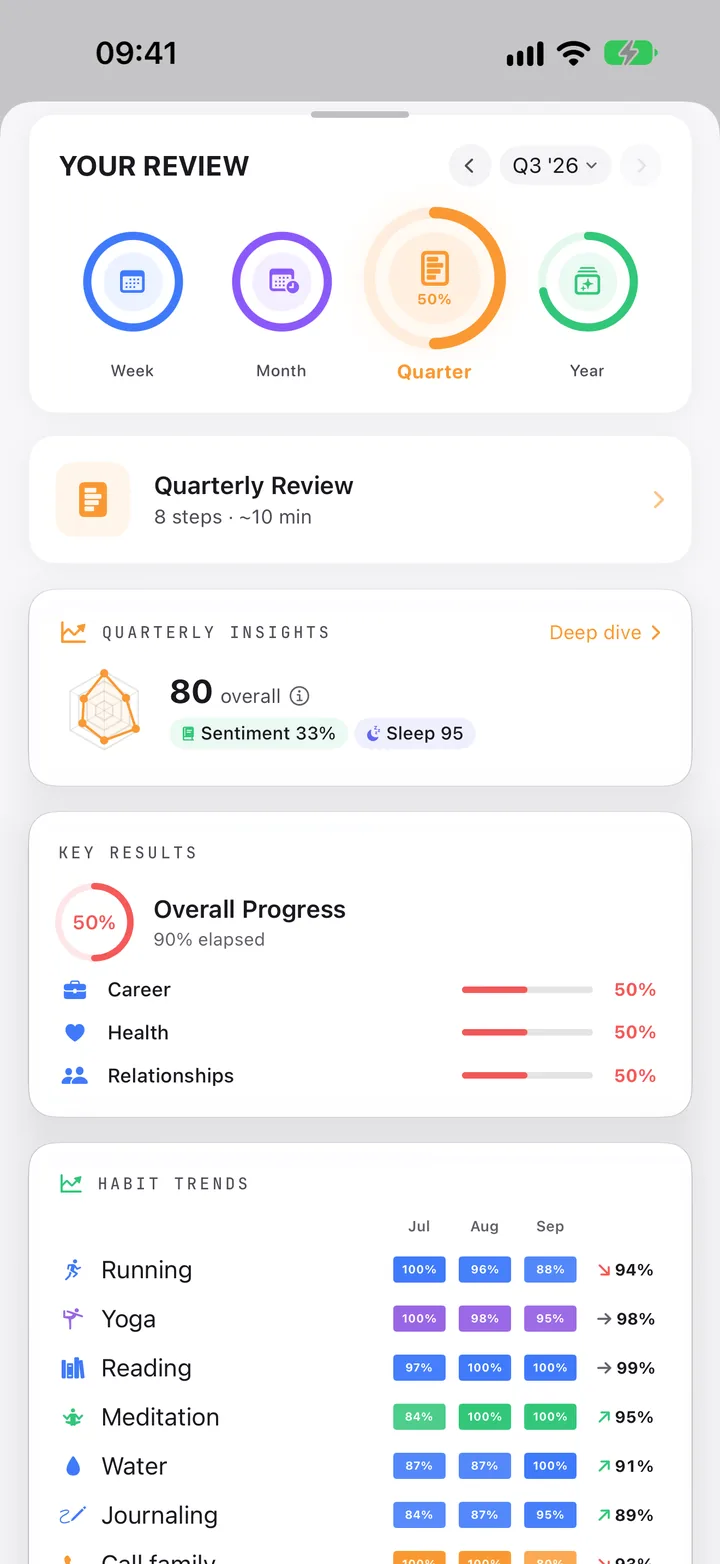
A score for each result, an honest retro, next quarter drafted from your goals, a Quarterly Letter.

Year11 steps · ~15 min

Biggest wins, who you became, what to let go, then next year’s plan, started from this one.

  • A drafted quarter says Carried over from Q3 2026. Tap Keep, or change anything.
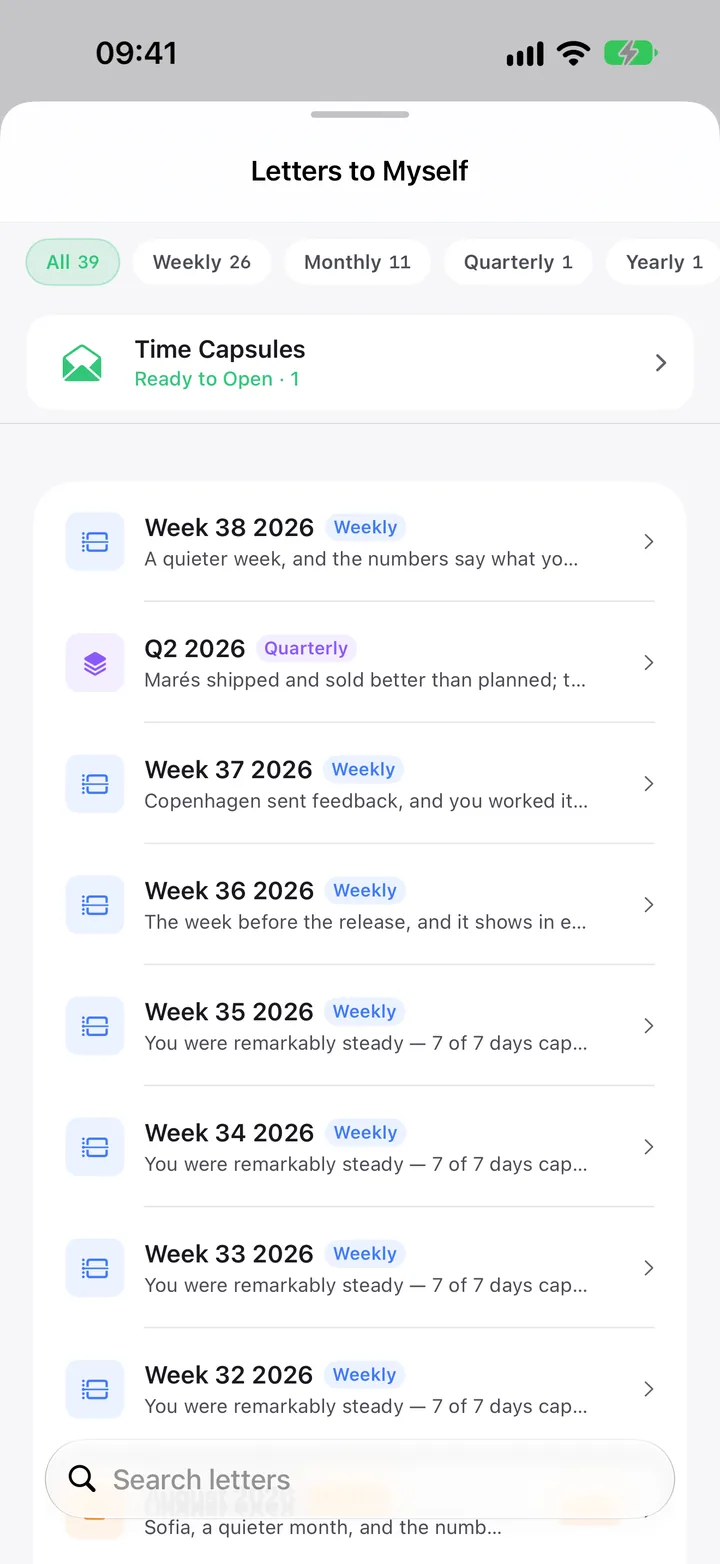
  • All letters wait in Letters to Myself, filtered by week, month, quarter or year.
  • At year’s end: Year Wrapped, an eight-slide story of your year, with Your Year in Words and Your Year in Data.
Your Review on Quarter: the same screen as the week, with the Quarterly Review, 8 steps, about 10 minutes.
Letters to Myself: weekly, monthly, quarterly and yearly letters.
8
A lifetimeSearch → Vision → Life Timeline · My Heritage

See your whole life.

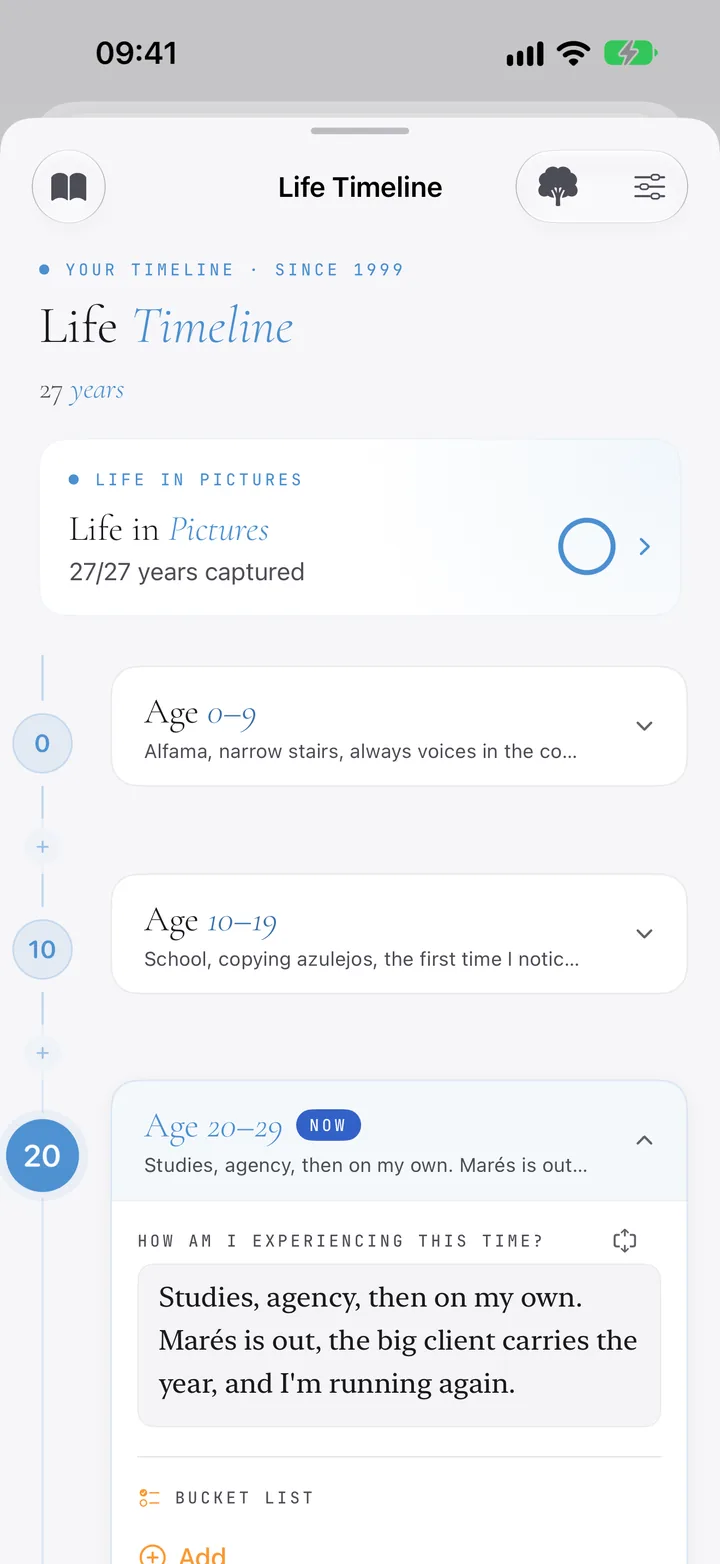
  • Life Timeline: enter your birth year and your life appears in decades, with chapters, gratitude, a bucket list and one photo per year.
  • Letter to Future Self: sealed until an age you choose.
  • My Heritage: start with your parents. A name is all you need. Add memories, and who told them.
  • Keep both as a PDF: your timeline, or a Family Legacy Book.
Life Timeline: decades with chapters and Life in Pictures.

08Journey · Capture and organize

A half-marathon, kept in one place.

Training for a race touches everything: a plan, the runs, what you read and ask, how you sleep, the finish line. One thread holds it together, and one search finds any of it.

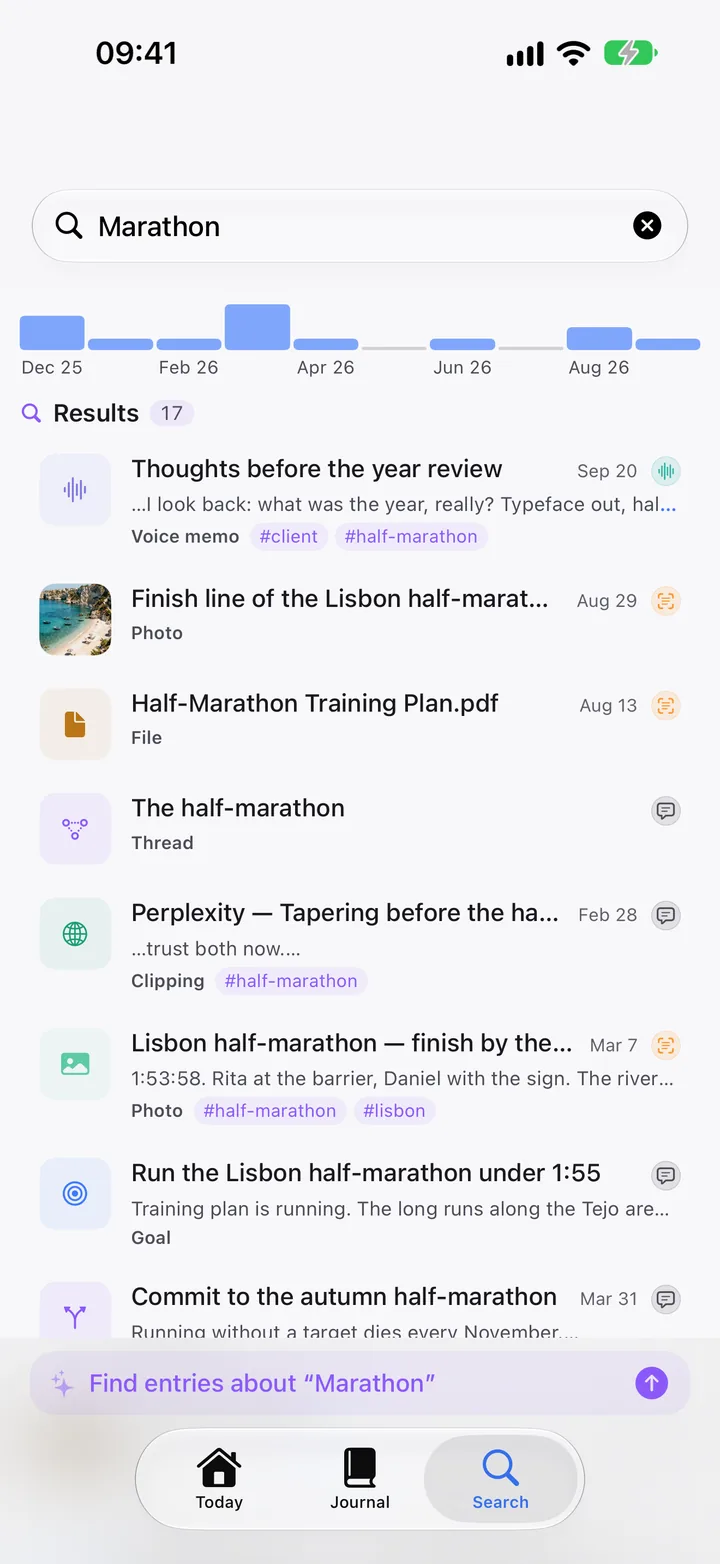
A search for “half-marathon” in Clarivio: the thread, the goal, a long run and an AI chat in one list.
A half-marathon, kept in one place · 30 seconds · sample data · also in the app, in How Clarivio works

After a runThe workout is already there. Say how it felt.

An AI chat on taperingShare → Clip to Clarivio

The training planA PDF from Mail or Files

The finish linePhotos, on the day they were taken

Thread
The half-marathon
Runs, and how they feltAI chat · your takeTraining plan · PDFFinish-line photos
Goal · Lisbon half under 1:55
Habit · Running, 4 days a week
Search “marathon”Voice notes, photos, the PDF, the thread, the AI chat and the goal, in one list.
Ask Clarivio“What did I learn about tapering?” The answer cites your entries.
Your reviewsThe key result moves each week; the photos come back in the year’s recap.
1
Once · optionalVision → My Year · Search → Clarity → Habits

Name the goal.

  • Make it this year’s Health goal, “Lisbon half-marathon under 1:55”, with a key result you can measure.
  • Add the habit that carries it: Running, with a weekly goal of four days.
  • Give it a key result in this quarter’s plan, and your mornings suggest it among today’s goals.
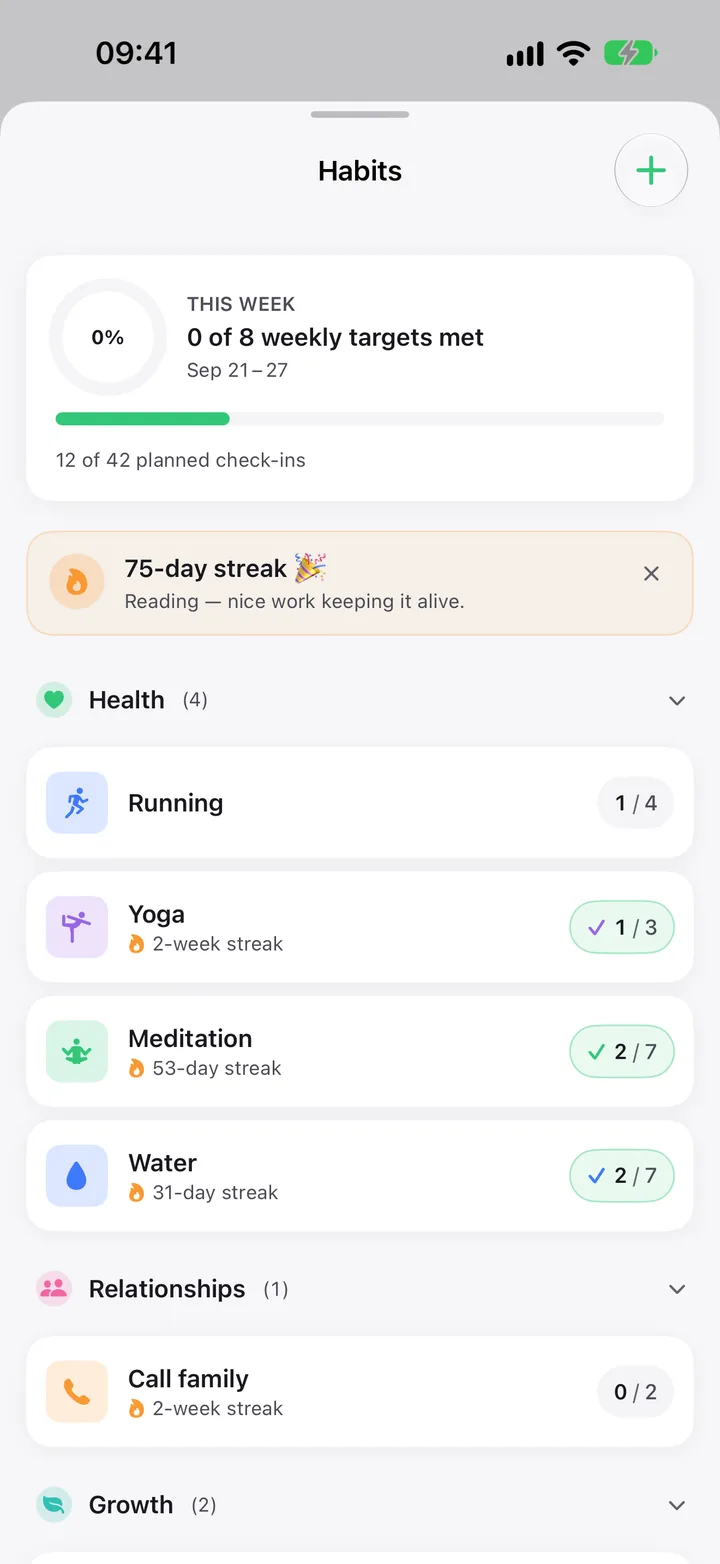
Habits: Running at 1 of 4 this week, with Yoga, Meditation and Water.
2
Once · 10 secondsCapture → Start thread from this

Start a thread.

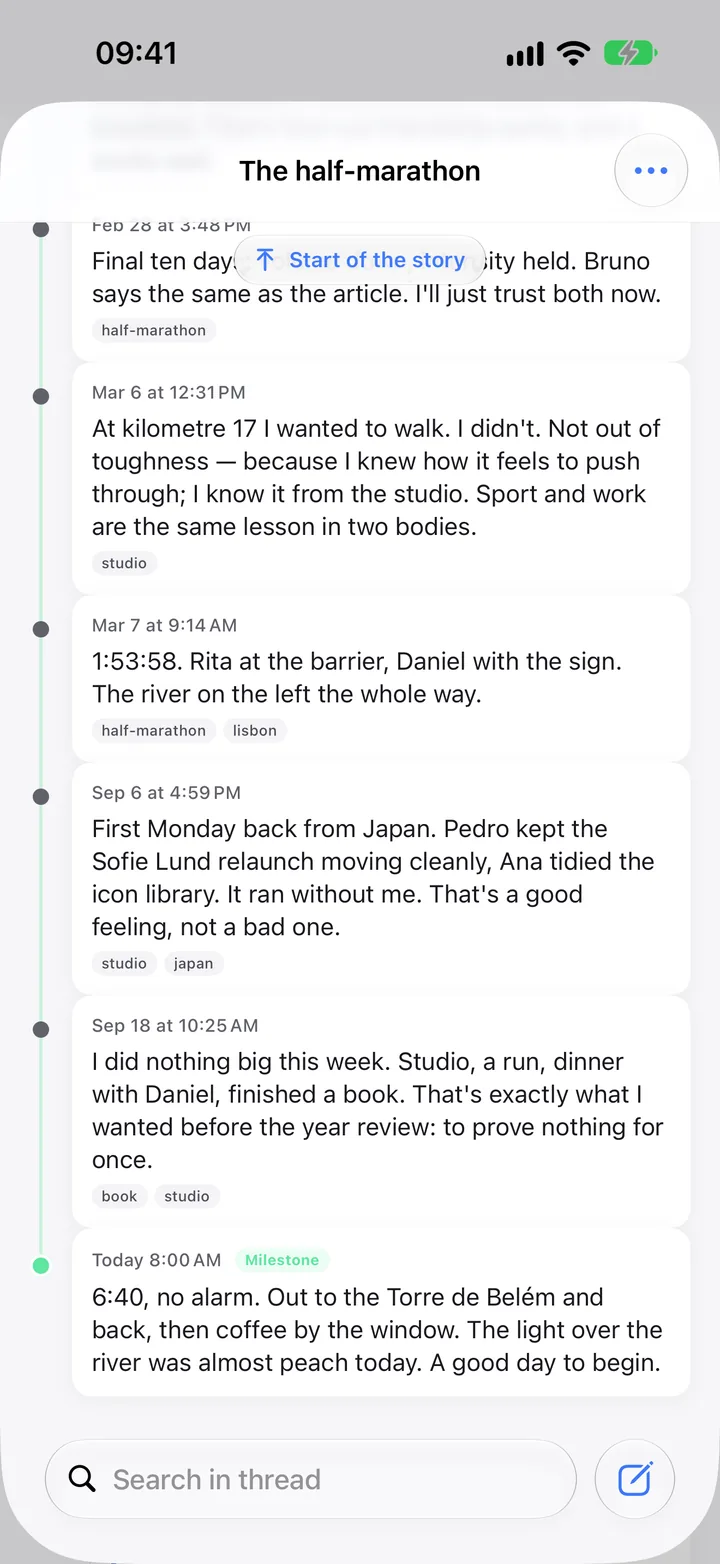
  • A thread follows one story across months. Everything in it reads as one story, oldest first.
  • Start it from the first entry, then add more with the Thread chip, in the capture sheet or the share sheet.
  • A notebook works too: it gathers what belongs together, while a thread keeps one story in order. Use either, or both.
The thread The half-marathon, with runs, an AI chat, a PDF and photos in order.
3
After each run · secondsTap + · Apple Watch → Capture

Capture as you go.

  • Open Capture after a run and the workout from Apple Health is already there: How did it feel?
  • Hold + and choose Voice to speak instead. On iPhone the transcript becomes searchable text.
  • On your Watch, Capture takes a spoken moment straight from the wrist.
The capture sheet showing a 44-minute run from Apple Health and a note being written.
4
While you learnShare → Clip to Clarivio

Keep what you learn.

  • Ask an AI how to taper, share the chat, and answer one question: What do you now know?
  • Add the training plan PDF from Mail or Files, with the Thread chip set.
  • About six weeks later, Clarivio asks whether that take still holds.
5
Every morningToday → Health Rail

Train with your body.

  • With an Apple Watch, Readiness each morning says whether today is for pushing or recovering.
  • After 14 paired days, Insights shows what really moves your energy and mood: sleep, training, stress.
Health Dashboard: readiness 77, Solid recovery, and today’s plan Train hard today.
6
Months later · secondsSearch tab

Find any of it again.

  • Search “marathon”: voice notes, photos, the PDF, the thread, the AI chat and the goal, in one list, over the whole year.
  • Or ask: “What did I learn about tapering?” The answer is written on your device and cites your own entries.
  • The finish-line photos sit on their day in the Journal, and come back in the year’s photo recap.
Search results for Marathon: a voice memo, photos, a training plan PDF, the thread, a Perplexity clip and the goal.

The same pattern, other projects

Taxes

A notebook “Tax” with “Tax 2025” and “Tax 2026” inside. Scan receipts from inside the notebook: vendor, total and VAT are read for you, and the files land in its iCloud Drive folder.

Moving house

A thread for the move. Clip each listing with your take, keep viewings in your calendar, and write the final choice as a decision with a forecast.

A new job

A decision with how likely you think it is to work out, notes after each conversation, and the people involved linked from Contacts.

09More journeys

Six more ways in, each a few taps long.

Short recipes for the rest of Clarivio. Pick the one that matches your week; ignore the others until you need them.

Clippings

Every clip gets your take.

When you read, hear or see something worth keeping.

  1. Share it from Safari, Podcasts, Maps, Books, YouTube or an AI chat to Clip to Clarivio.
  2. Each kind asks its own question. A podcast: What struck you? A place: Why this place? A book: What stays with you?
  3. Type or speak your answer. It becomes your own entry, linked to the clip.
  4. It comes back when you ask, and about six weeks later to see whether it still holds.

Search → Structure → Clipped links

A clipped podcast episode with the user’s take.
Body, mind and habits

Know what your body says.

When you want to see what really moves your energy.

  1. Allow Apple Health. Sleep, HRV and workouts arrive; with an Apple Watch, Readiness shows each morning on Today.
  2. Add a habit with a weekly goal, 1 to 7 days. Tick it in the evening, on the widget or on your Watch.
  3. Feeling tense? Mindfulness asks where you are: Activate, Calm, Focus, Recover or Sleep.
  4. After 14 paired days, Insights shows what moves your mood, and how sure it is.

Today → Health Rail · Search → Clarity

Habits: weekly targets, streaks and habits grouped by life area.
Ideas, challenges, decisions

From a hunch to a call you can check.

When something keeps going round in your head.

  1. An idea: drop it in. Later, triage the inbox one card at a time: Mature, Park, Validate or Kill.
  2. A challenge: name what you are up against and what would settle it. First check-in in a week.
  3. A decision: write it, the outcome you expect, and how likely it is. A title alone is enough.
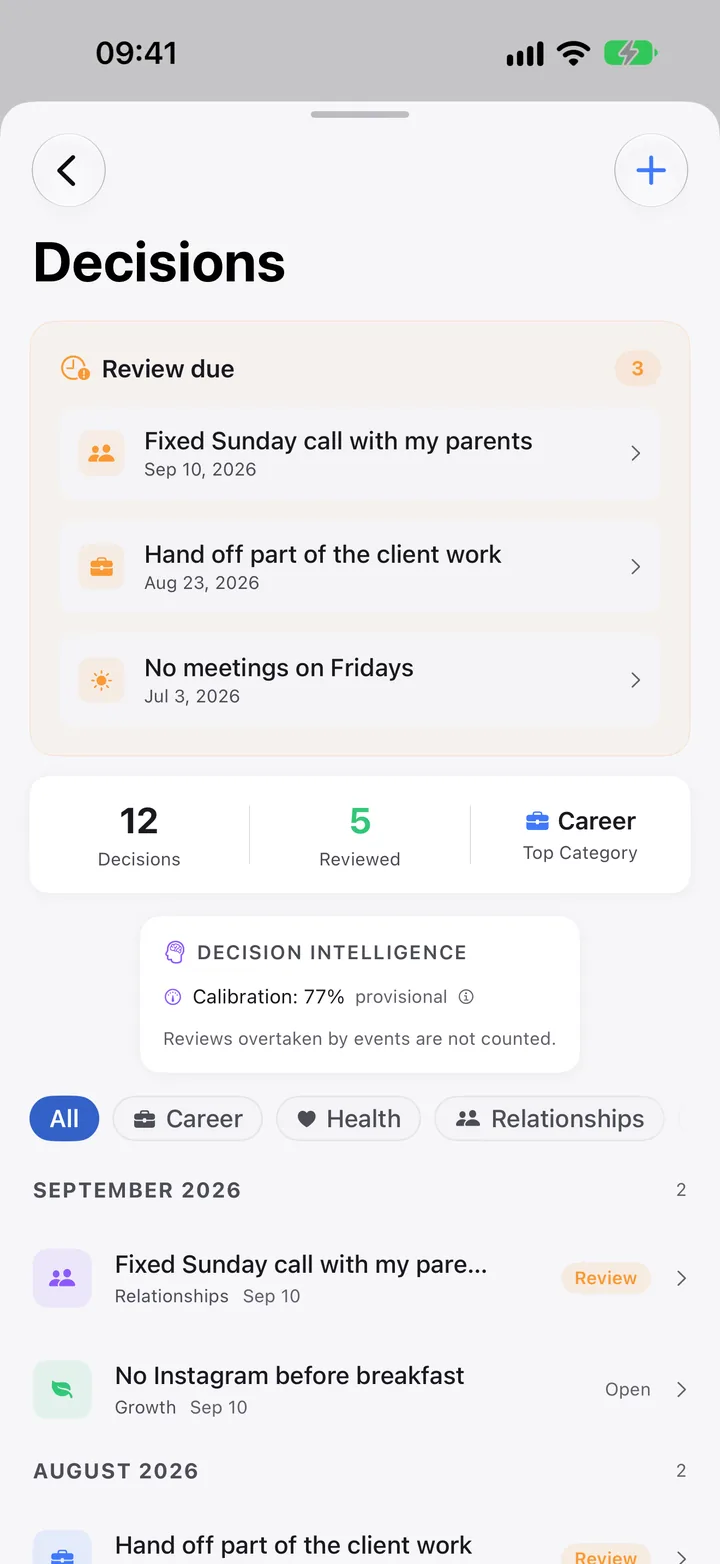
  4. On the review day, did it happen? After five, you see how well calibrated your calls are.

Search → Clarity → Ideas · Challenges · Decisions

Decisions: reviews due, counts and calibration.
Triage · Organize

Clear what’s waiting, in one pass.

When things pile up, or once a week.

  1. Pending on Today shows at most two things. The rest wait behind “+N more”.
  2. Tasks Clarivio spotted in your notes: Send to Reminders or Discard.
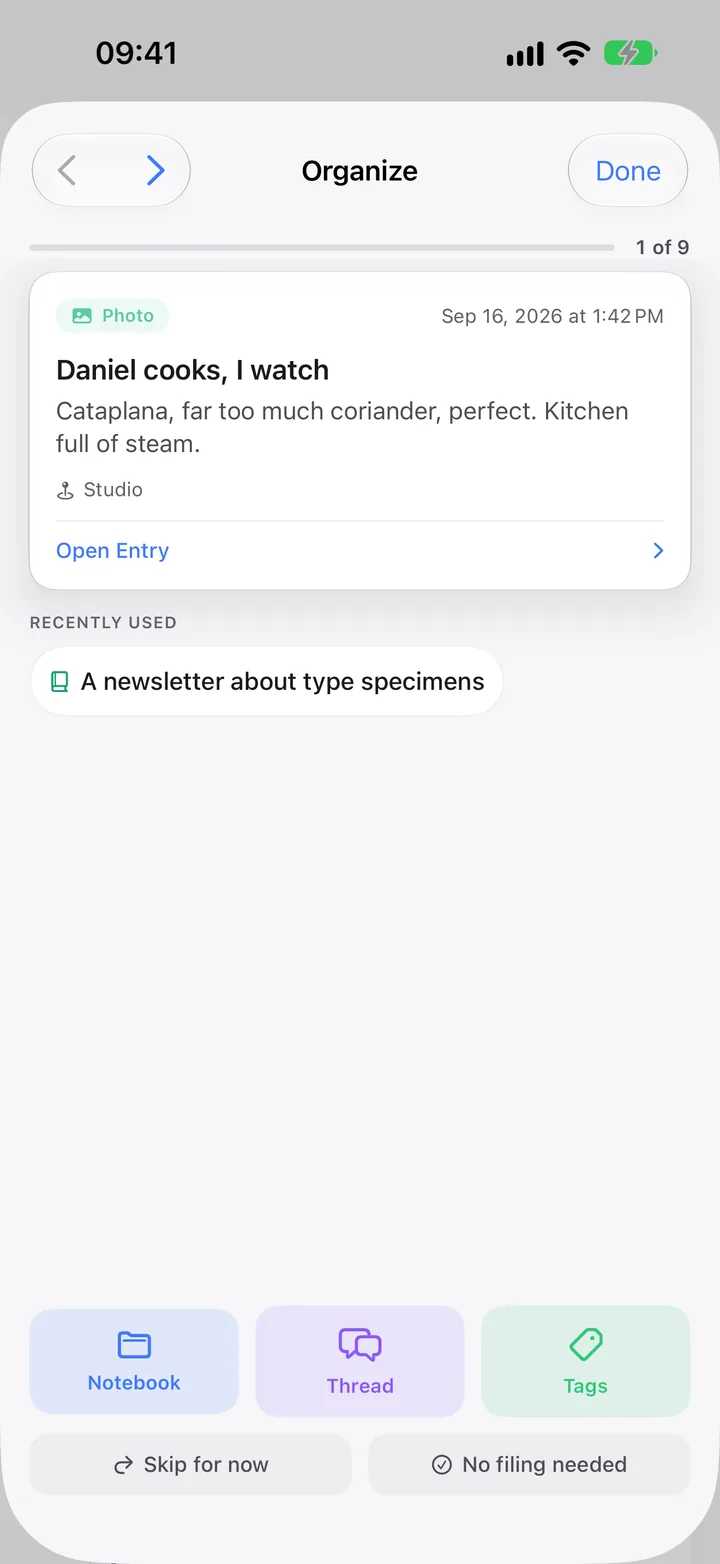
  3. Organize deals you everything unfiled, one card at a time, with suggestions. Skip any.
  4. Cockpit gathers what waits: reminders, meetings, suggestions, people.

Search → Cockpit → Organize · Reminders

Organize: one unfiled photo at a time, with Notebook, Thread, Tags, Skip for now and No filing needed.
People

Nobody quietly drifts away.

When you want to keep in touch without a spreadsheet.

  1. Link the people who matter by picking them from Contacts. Nothing is imported in bulk.
  2. Place them in circles; each circle sets a rhythm, or set your own.
  3. Each morning the briefing shows who is due and whose birthday it is: Reach out, Send wishes.
  4. Turn on Pre-meeting prompt in Settings › Calendar, and before a meeting you see what you wrote last time and what you wanted to bring up.

Search → Cockpit → Network

Network: people to reconnect with and the core circle.
Calendar and reminders

The day, before it has you.

Every morning, and before every meeting.

  1. The Morning Briefing shows weather and daylight, today’s events and open reminders.
  2. Complete a reminder or Move to tomorrow right there. In the evening it shows tomorrow.
  3. Calendar Briefing: the next meeting with your last note from that series, and Take notes now.
  4. Meetings from the past week you never wrote up are listed, so nothing slips.

Today → Briefing · Search → Cockpit → Calendar

Morning Briefing: weather, four events and six open reminders.

10How it all fits together

One loop, at every zoom level.

Direction is what you declare. Rhythm is what you repeat. Memory is what you keep. Each one feeds the next, from five seconds to a lifetime.

How the parts of Clarivio connect Three bands along one time axis from five seconds to a lifetime. Direction holds key results, yearly goals, three- and ten-year goals and the Compass. Rhythm holds the daily sessions and the weekly, monthly, quarterly and yearly reviews on the horizon line. Memory holds capture, the Journal and your story. Key results are suggested as the morning’s goals; the weekly review updates them, the quarterly review drafts the next quarter and the yearly review starts next year’s plan; every session and review is saved to the Journal; each review opens with what the period held; your Apple apps feed the Journal, and it comes back through search, Ask, letters, recaps, On This Day and the briefing. 5 SDAYWEEKMONTHQUARTERYEAR3 YEARS10 YEARSLIFE DIRECTION RHYTHM MEMORY what you declare what you repeat what you keep Key resultsthis quarter Goalssix life areas Milestones3-Year Plan Think big10-Year Plan Compassvalues, purpose each horizon frames the shorter one SessionsWeeklyMonthlyQuarterlyYearly AM · PM~8 MIN~8 MIN~10 MIN~15 MIN suggested as today’s goals + / − each week drafts next quarter starts next year’s plan Capture any time Journal every entry, session and review, on its day Your story timeline, family grey: saved to the Journal blue: each review opens with what the period held ARRIVES BY ITSELF from your Apple apps, once you allow each one HealthCalendarRemindersContactsPhotosWeatherPlaces COMES BACK AS found again when it matters SearchAskLettersRecapsOn This DayThe Briefing

Plans and days, both ways

Direction ⇄ Rhythm

This quarter’s goals are suggested each morning. Each weekly review moves your results; the quarterly review drafts the next quarter, the yearly review the next year.

Days fill the memory

Rhythm → Memory

Every session, entry and review lands in the Journal on its day, with its health, weather and place.

Memory feeds what’s next

Memory → Rhythm

Each review opens with what the period held. Takes, letters, recaps and On This Day bring it back.

11Getting started

Start with two. Grow into seven.

Nobody should adopt seven use cases in a week. This order pays off fastest, and it says when each part starts giving something back.

Day 1

Do

Capture whatever comes up. Clip one thing you’re reading. A Quick morning and evening, about three minutes.

Get

Entries that keep their day, your first take, and tonight’s plan waiting tomorrow morning.

Week 1

Do

Your first weekly review. Allow Apple Health. Link your five closest people.

Get

Readiness each morning, with an Apple Watch. Birthdays and who is due, in your briefing.

Month 1

Do

Set your course: values, a goal for the areas that matter, this quarter’s focus. Organize once. Your first monthly review.

Get

This quarter’s goals in your mornings, and one place for everything you kept.

Quarter 1

Do

Write important decisions with a forecast. Your first quarterly review.

Get

Patterns as each reaches 14 paired days. Your first takes come back. Calibration after five forecasts.

Year 1

Do

The yearly review. Start your Life Timeline and your family tree.

Get

Year Wrapped and Your Year in Words, made from what you actually kept.

Today helps along. In your first days it shows cards like Write your first entry, Connect Apple Health, Who are your five? and Your first weekly review. Dismiss any you don’t want.

If you came to stop losing things

Capture everything

  1. Use the + for everything today: a thought, a receipt, a photo.
  2. Clip one article or podcast and answer its question.
  3. On Sunday, run Organize once. Or don’t.

If you came for calmer days

Plan and reflect

  1. A Quick morning and a Quick evening, about 90 seconds each.
  2. Allow Apple Health, so the day knows how you slept.
  3. Your first weekly review on Sunday evening.

If you came for direction

Set your course

  1. Answer the three Vision questions.
  2. One focus area this quarter, with three key results.
  3. Let the morning suggest them; move them each Sunday.